
Why switch · the short version
What Hayven does that your POS booking and turn app can’t.
Keep your POS for payments. Let Hayven run the phone, the booking, the turns and the new-client marketing, where every part sees the others. Here’s why, in plain words.
1 · AI receptionist
An AI receptionist that knows your salon.
Lots of AI phones can pick up. Hayven’s works inside the system that runs your day, so it sees what your front desk sees, and it books for real.
- Your team’s phones ring first. It answers only when nobody picks up, or when you’re closed.
- It sees each tech’s open times on your Hayven calendar and books the appointment during the call.
- It asks only what it needs, reads the details back, and books after a clear yes. She gets your confirmation text.
- It knows your regulars: “same as last time” books her last visit, and it offers her usual tech.
- It knows your menu, your prices and your answers to the questions callers always ask: parking, tips, gift cards.
- It moves or cancels her own visit inside your rules, and tells walk-in callers the wait if you use check-in.
- Every call lands in the client’s Inbox thread with a summary, and you can play the recording. “Needs you” shows only when your team has to act.
It speaks English and says it’s a virtual assistant. It sees a regular’s visits only when the carrier confirms her number. Recordings are deleted after 90 days.
Phone assistant · Answered while you were busy · 1:52
Booked Gel Manicure · Mon, Oct 19 · 10:30 AM · Ly
Phone assistant · Answered while you were busy · 0:41
Needs you
Running late ~10 min · Gold Pedicure · Sat, Oct 17 · 3:00 PM · Min
Texted back automatically
2 · Turn tracker
Turns that see who just walked in.
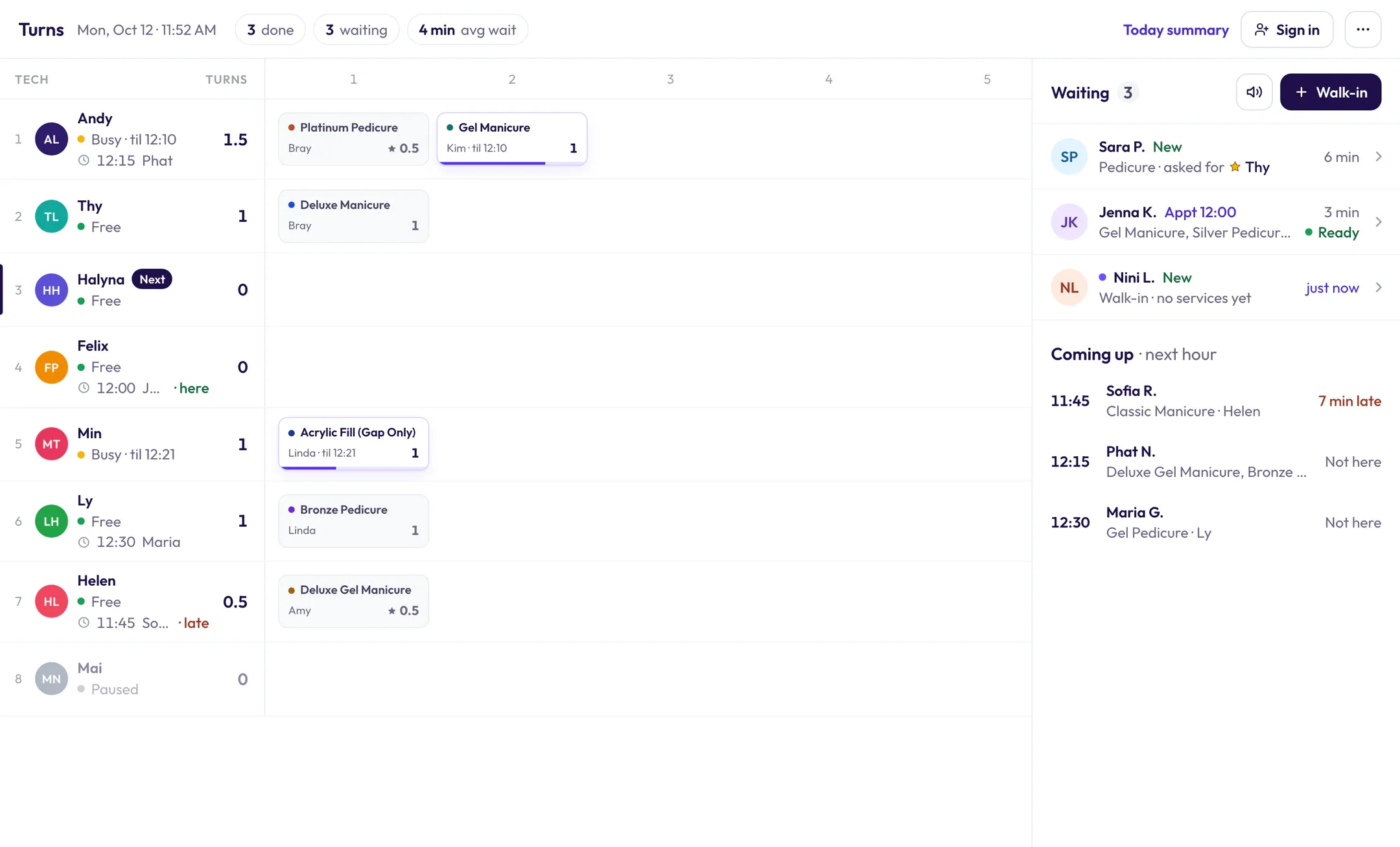
A turn app that can’t see your calendar only knows who’s standing in line. Hayven’s Turns also sees your check-ins, your bookings and your promos.
- She checks in on the iPad, the wall poster or her text link, and she’s on Turns right away.
- Each client is marked: walk-in (“New”) or booked (“Appt 4:30”). Booked clients on the way show under “Coming up”.
- Asked for a tech? She’s marked ★ from her booking or check-in, and the turn counts by your rule. No asking around.
- Give a walk-in to a tech and she’s on the calendar right away, so online booking can’t take that time.
- New Client Offer and referral clients are marked on Turns with their gift, like “15% OFF”, so the desk knows what to take off at the POS.
3 · Turn tracker
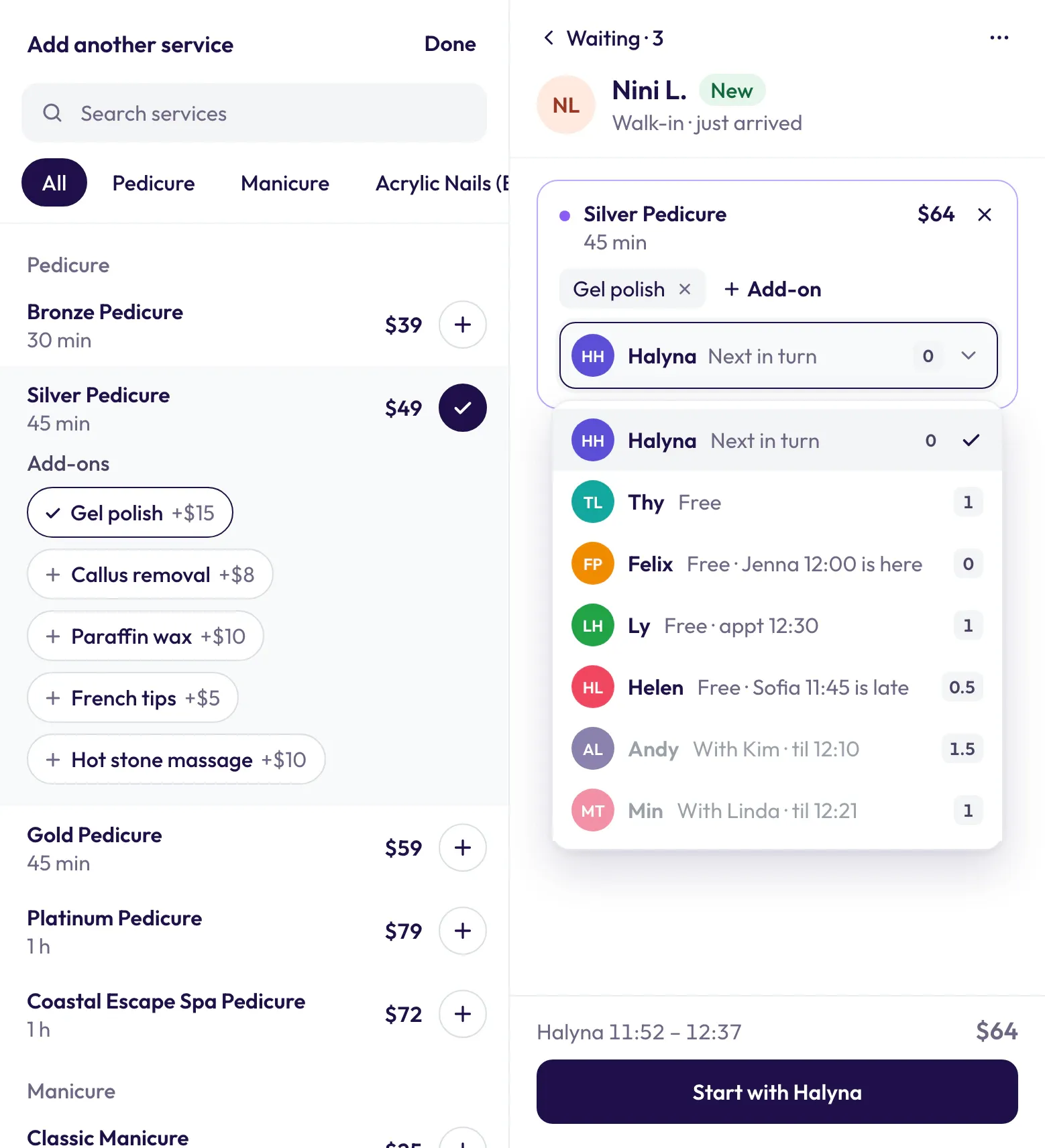
The right tech, picked for you. One tap to start.
Hayven suggests the next tech, the desk checks it and taps Start. Because Turns sees the calendar, it knows things a turn app can’t.
- It follows your turn order, so it stays fair.
- It only suggests techs who are free now and can do every service on the ticket.
- It skips a tech whose next booked client is due before she’d finish, and she keeps her place in line.
- Hands & feet at the same time with two techs, several services in one visit, same tech or different techs.
- Her requested tech is busy? Give her to someone else. It counts as a normal turn for that tech.
- A clean, modern board: who’s waiting, who’s coming up, who’s next, and who’s with whom until when.
- Every turn and every desk change is in the Today report, so nobody argues about turns.
4 · Online booking
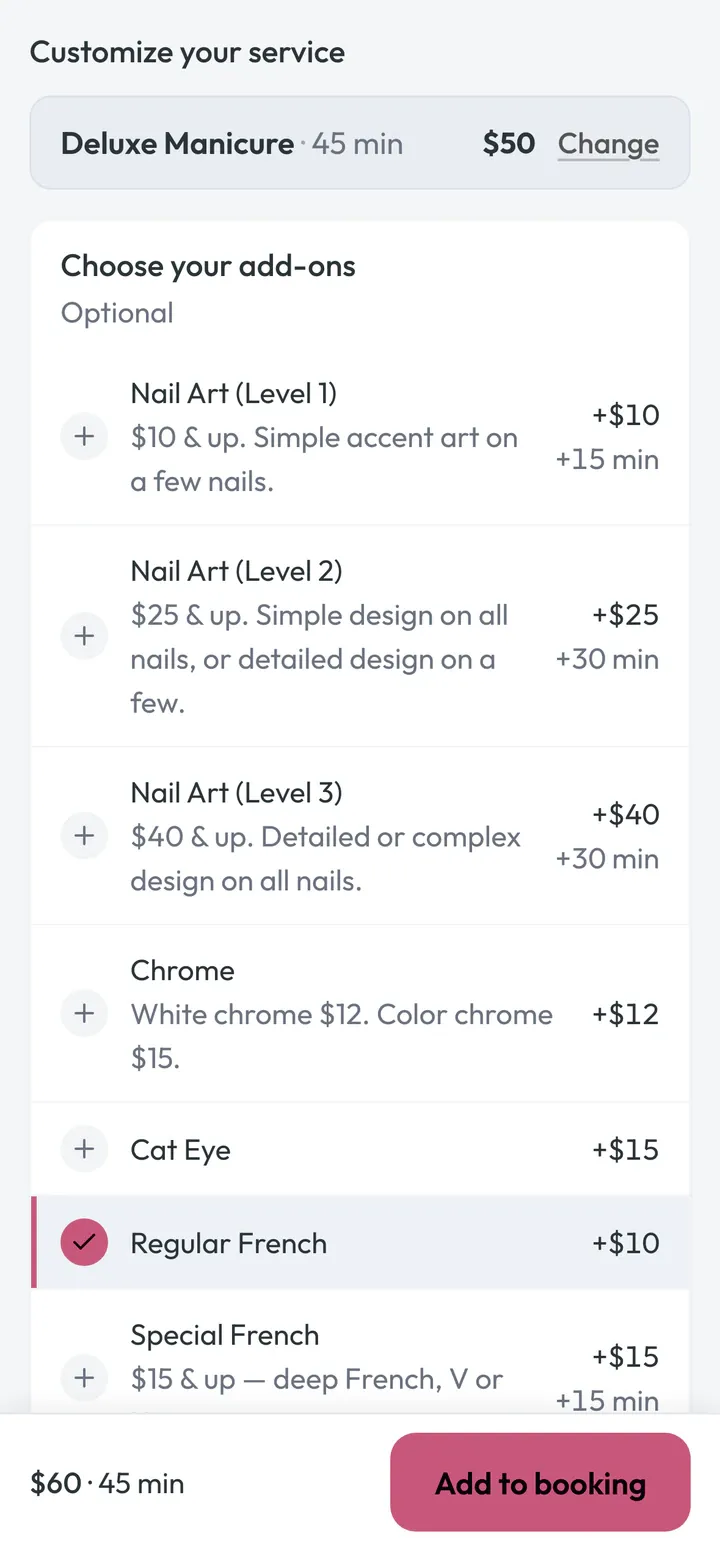
A booking page your clients enjoy using.
Made for how nail clients book: services, add-ons, tech and time in three easy steps. No account, no password.
- Add-ons show right after the service she picks, so she adds the extras herself.
- She can pick a different tech for each service, or Anyone.
- Smart times: Hayven hides start times that would leave a gap too short to book.
- Two clients can’t grab the same time. The second one sees “That time was just booked.”
- Every booking lands on your calendar with clear icons: online, walk-in, requested, Anyone, same time.
- Rather pick the tech yourself? Turn off tech choice and every client books Anyone.
5 · Online booking
Bookings a typical POS page can’t take.
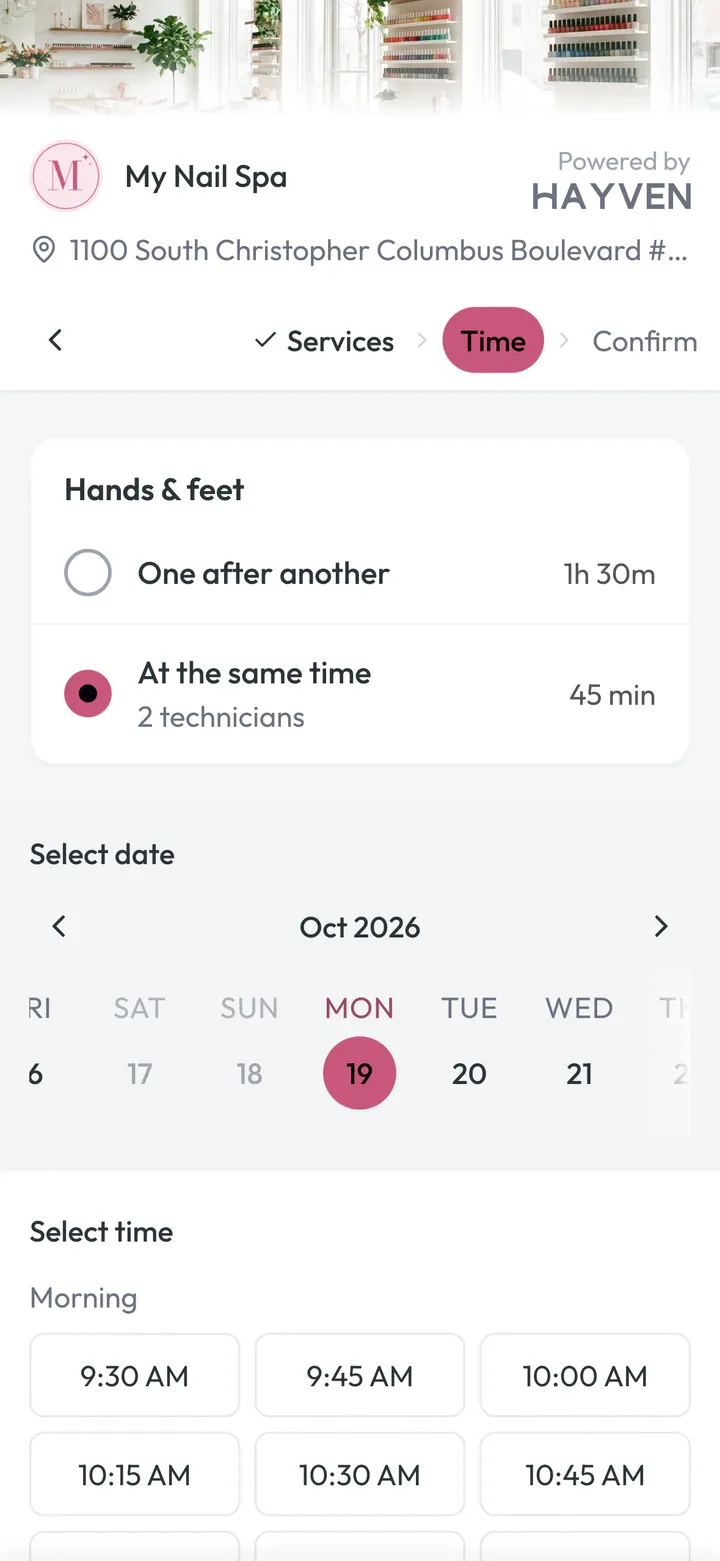
The visits nail salons really get: two techs at once, friends booking together, and clients who don’t show.
- Hands & feet at the same time: two techs, one start time, booked online in one go.
- Group visits: up to 5 guests, one start time, each picks her own tech, one link to manage it all.
- No-show protection: she saves a card when she books. No-show or late cancel? Your desk decides whether to charge your fee.
Same-time and group booking are settings you turn on.
6 · Smart Anyone
No more Anyone 1, Anyone 2.
A lot of booking pages park Anyone clients in a pretend column, and the desk finds the clash later. Hayven puts every Anyone booking on a real tech right away.
- Fair pick: it keeps her visit with one tech when it can, then picks the tech with the least booked time that day.
- Someone asks for that tech at that time later? The Anyone client moves to another free tech, same time and price, up to 2 hours before.
- So your requested techs stay open for the clients who asked for them.
- When her visit starts, Turns offers whoever’s next in turn. The desk can keep the booked tech with one tap.
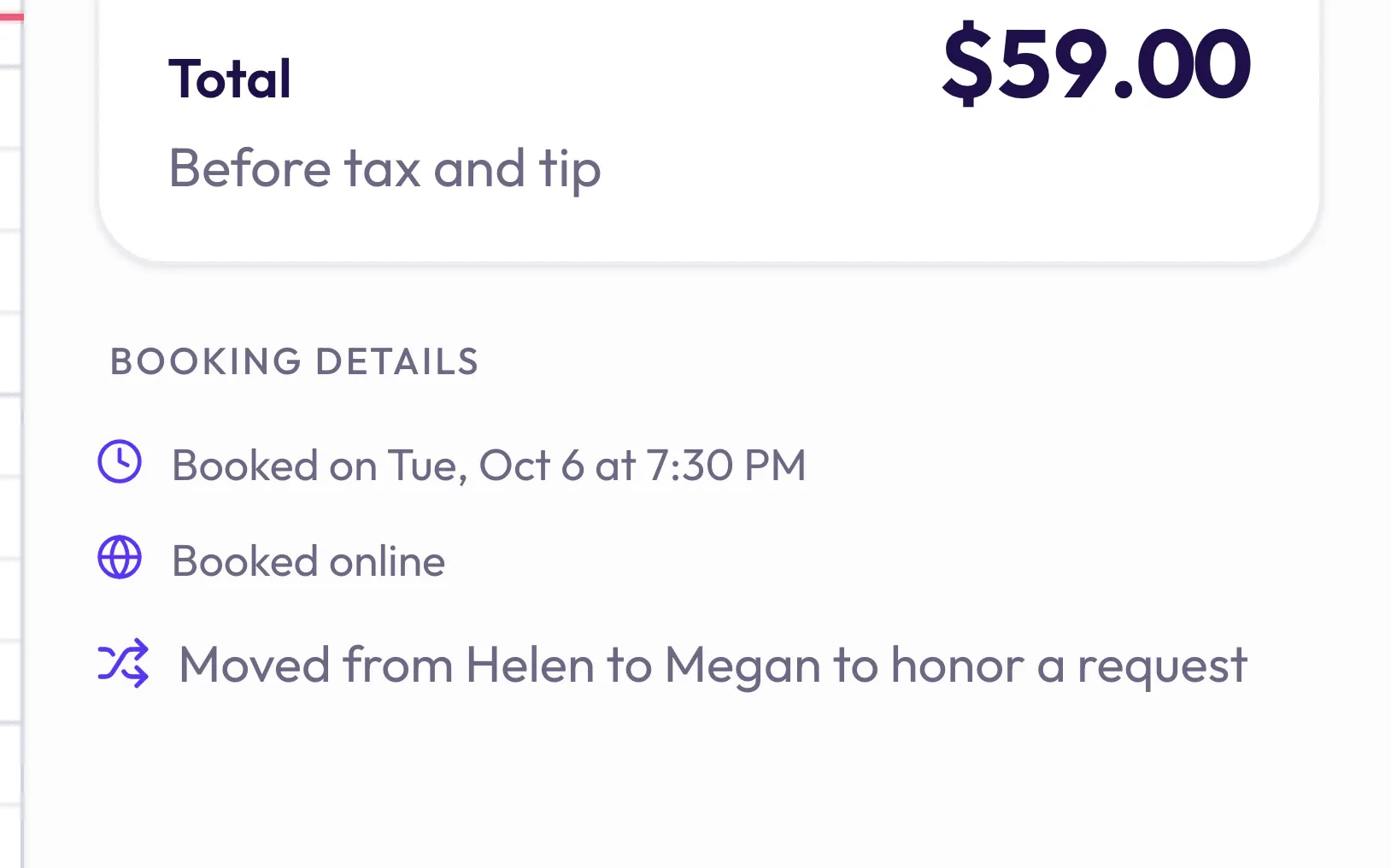
7 · Inbox & texts
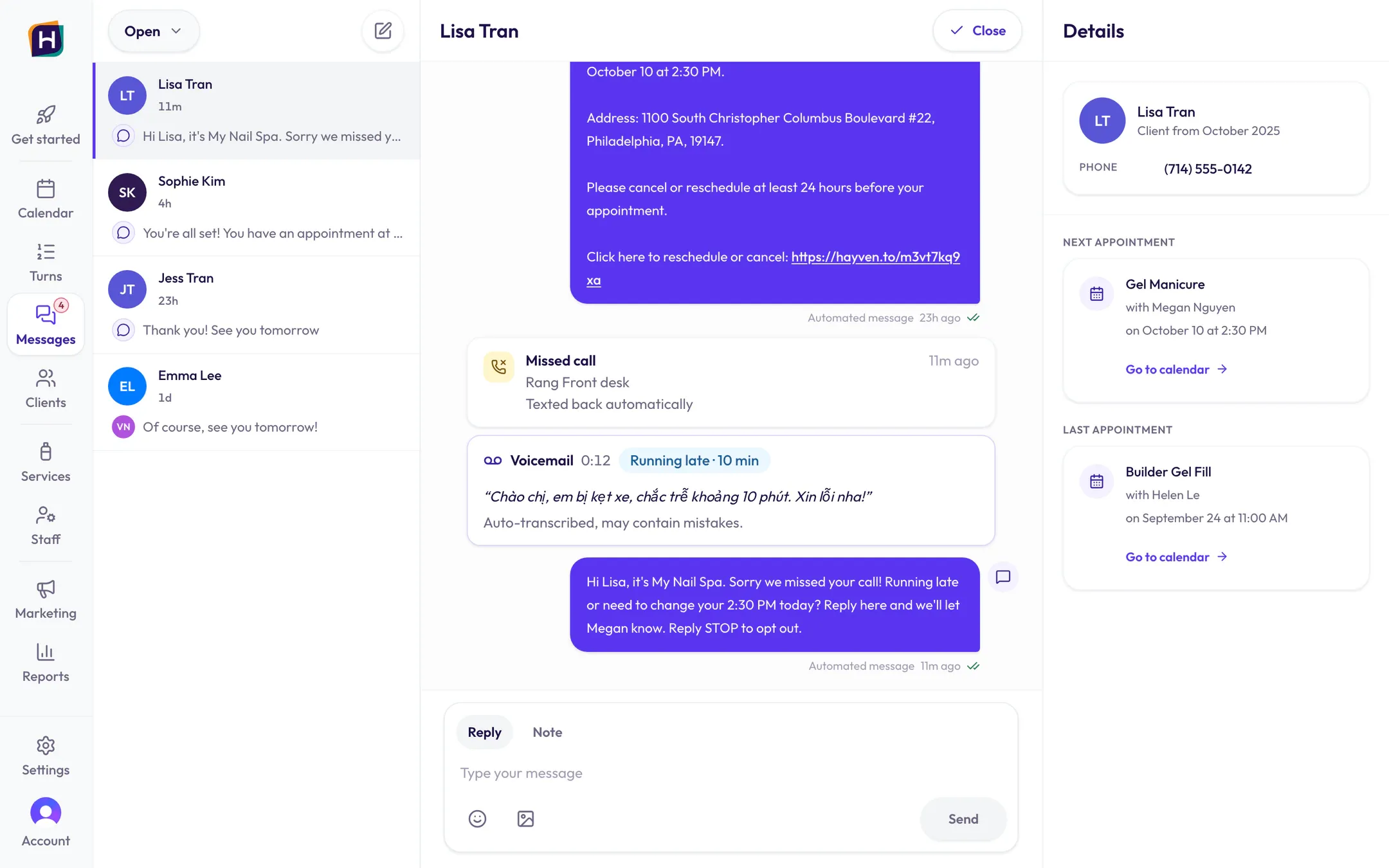
Every text, DM and call in one Inbox.
No more checking the salon phone, Facebook and Instagram one by one. And the everyday texts go out on their own.
- Texts, Facebook Messenger and Instagram DMs, in one thread per client.
- “Needs you” shows what your team has to answer. Automatic texts don’t pile up there.
- Nobody picked up? The AI receptionist answers, or the caller gets a text back.
- Voicemails come in as text, so you read them instead of listening.
- Texts that send themselves: booking confirmation, reminders 2 days, 1 day and same day before, reschedule and cancel notes, check-in link, review ask.
- Follow-up texts to people who signed up for your offer but haven’t booked. They stop once she books.
8 · New Client Offer
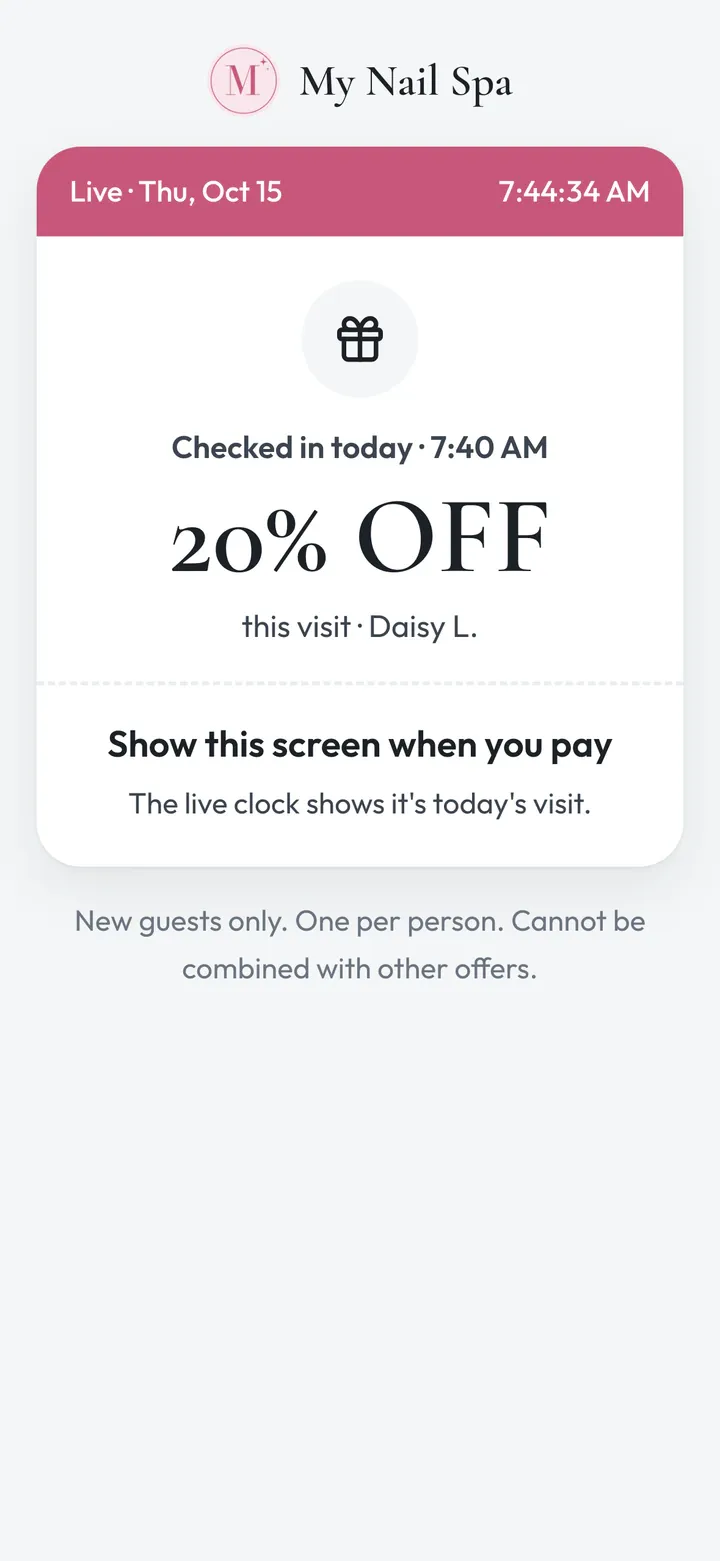
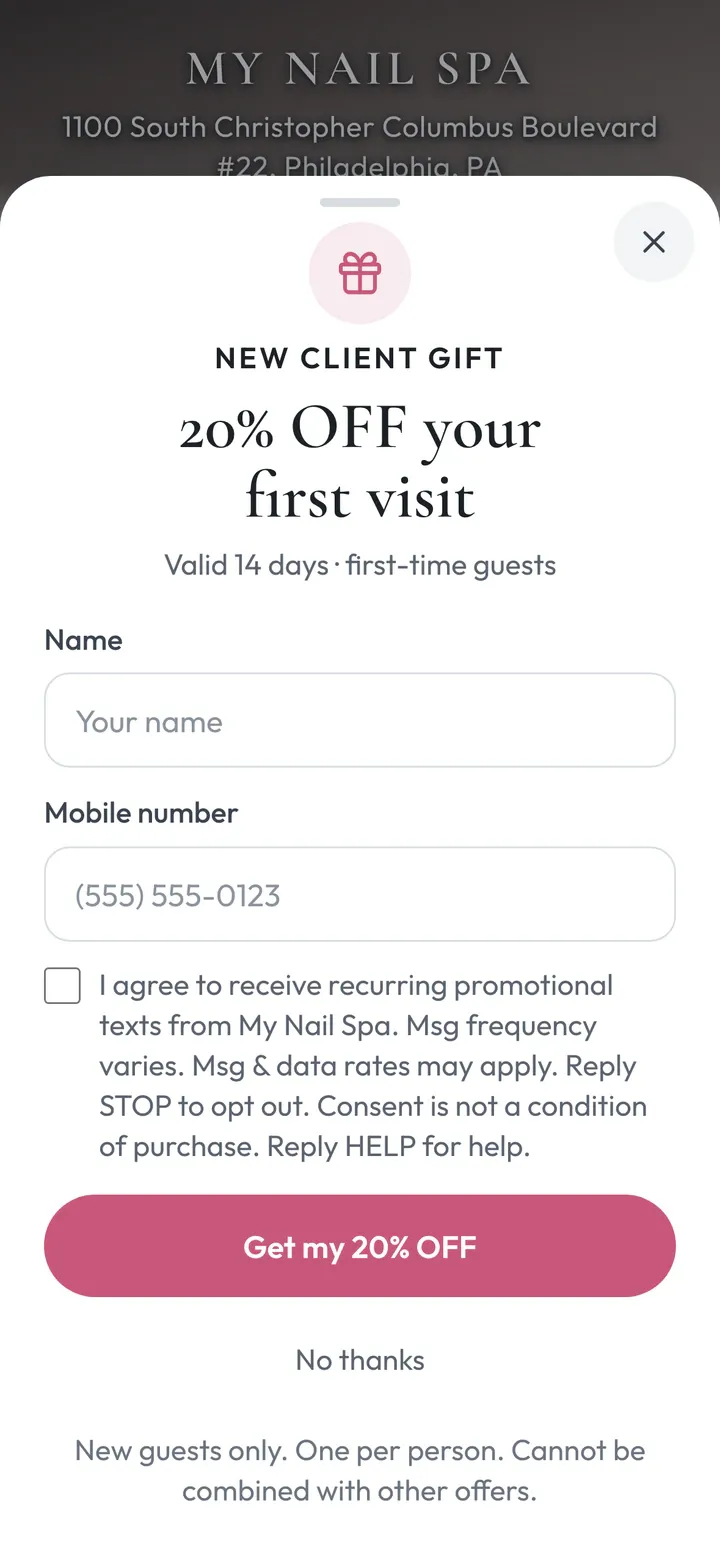
A first-visit gift only new clients can claim.
Paper coupons and promo codes get used by regulars too. Hayven checks before the gift goes out.
- New clients claim your gift with just a phone number.
- Regulars can’t claim it: Hayven checks your visit history and your client list.
- One gift per person, even if she signs up twice.
- Her pass shows a live “Checked in today” screen, so a screenshot won’t work.
- Reminder texts until she books. The gift is used when her visit is marked Done.
9 · Refer a Friend
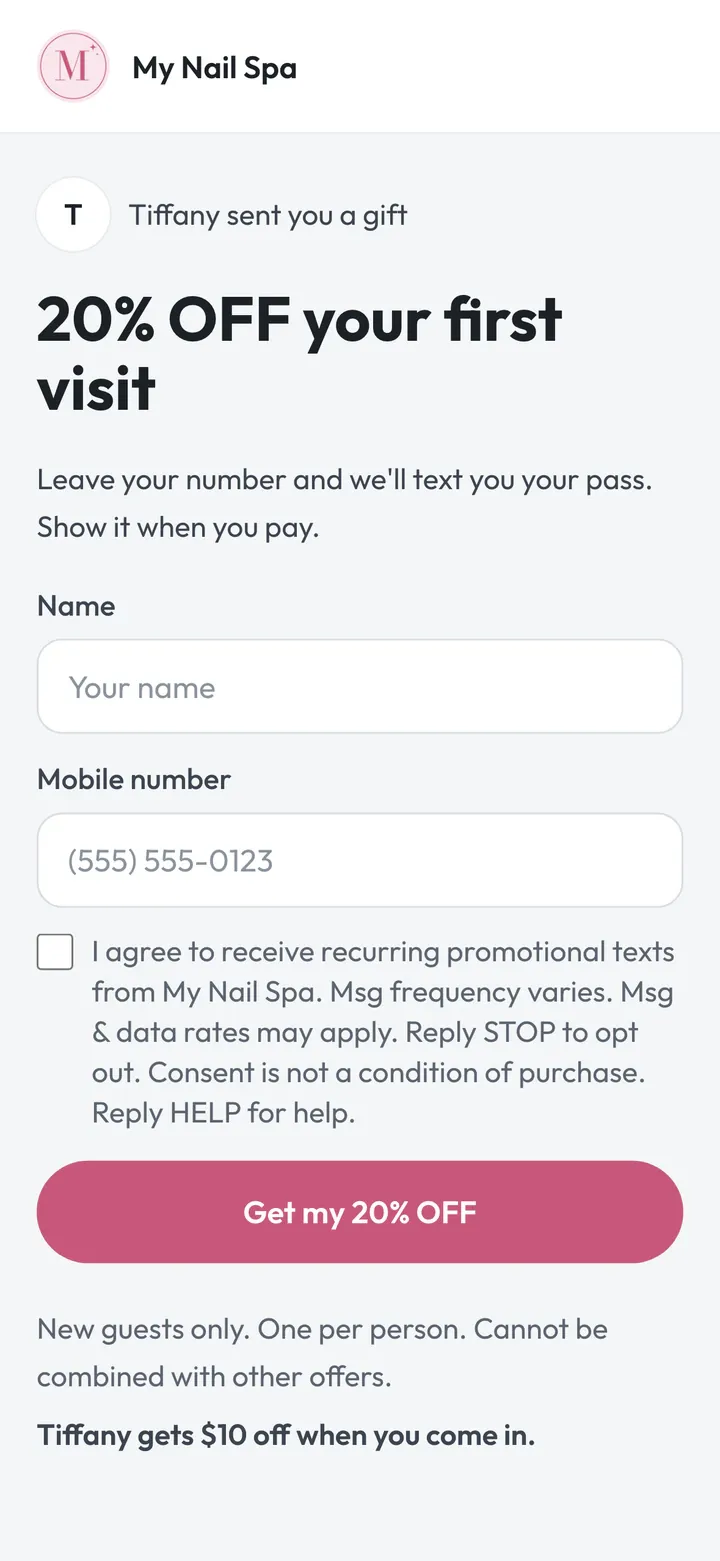
Your regulars bring their friends, with one link.
No codes to remember and no paper slips to keep track of. Clients just text their own link.
- Every client gets a personal link to share with friends.
- The friend gets your first-visit gift. Your client gets $10 off by default, after her friend’s visit is Done.
- Invites go out on their own, 3 days after a visit, at most once every 90 days.
- Friends who’ve been in before don’t count, so you only reward real new clients.
- The reward shows on your calendar at her next visit.
10 · Google reviews & ranking
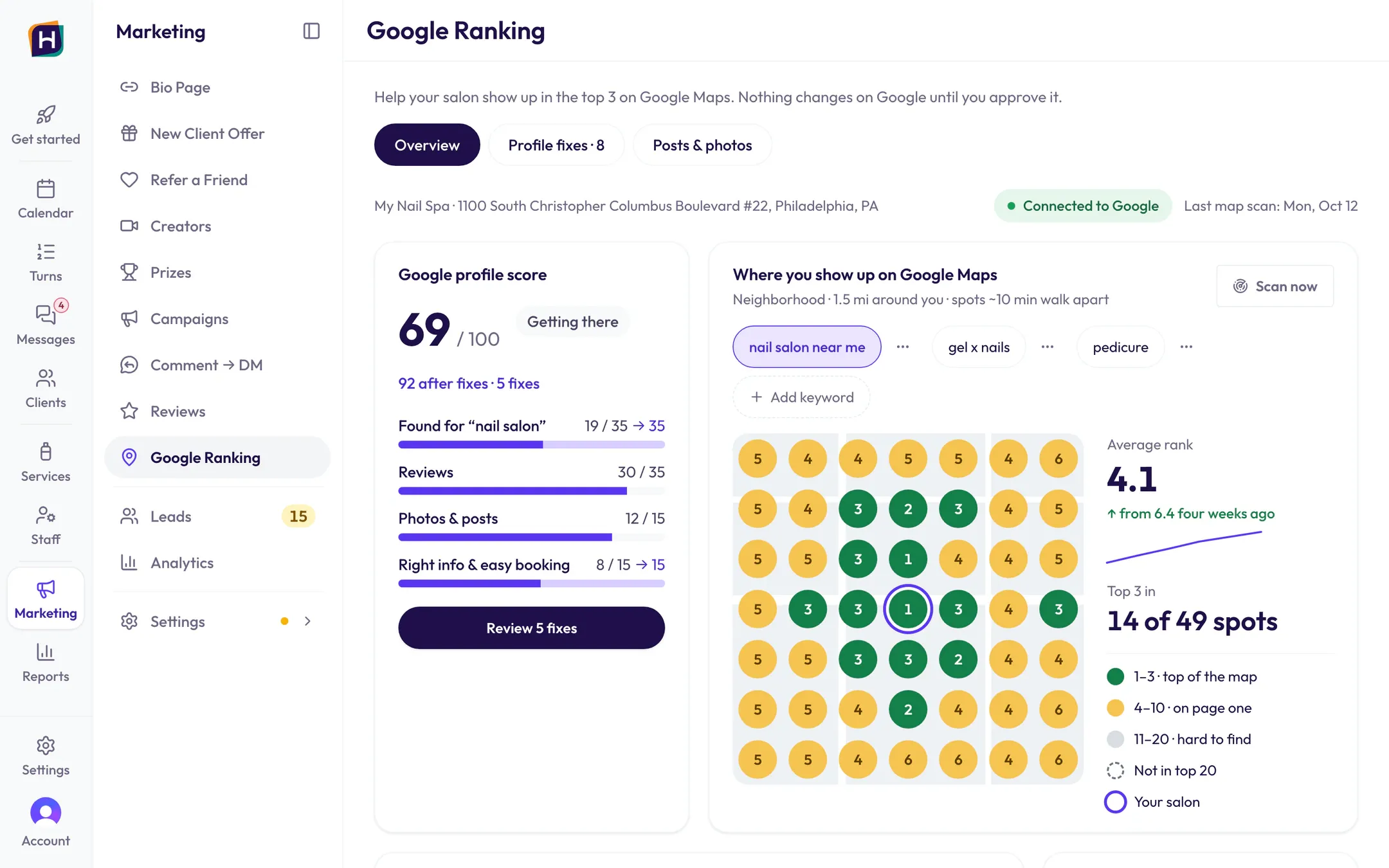
More Google reviews, and help climbing Google Maps.
New clients check your reviews and your Google profile first. Hayven asks for reviews, writes replies and shows you what to fix.
- A review text goes out about an hour after the visit is marked Done. Never twice in 90 days.
- A 1–3 star review comes in? You get an email, so you can make it right.
- AI writes a reply to every review. You tap Post, or let it post replies to 4–5 star reviews on its own.
- Every week, see where you show on Google Maps at 49 spots around your salon.
- Profile check-up: a 0–100 score, 17 checks, and fixes you approve. Your name and address are never changed.
11 · Bio Page & marketing
A Bio Page, and marketing done for you.
Hayven helps bring new clients in, then shows you who came and what brought them.
- One link for Instagram, TikTok and Facebook: Book, Call, Text, Directions. 18 designs to pick from.
- Your open hours and Google stars on it update themselves.
- See which ad or post brought each new client, right on the calendar.
- Want it done for you? The Hayven team runs your marketing.
Side by side
Your POS booking and turn app, next to Hayven.
Same salon, same POS. The difference is whether the parts see each other.
| Job | What most salons use POS booking page + a separate turn app | Hayven + your POS |
|---|---|---|
| Missed calls | Voicemail, call back later | The AI receptionist answers and books on the tech’s calendar |
| Online booking | The booking page that comes with the POS | Add-ons right after the service, a tech per service, same-time and group visits, no-show protection with a saved card |
| Clients who pick “Anyone” | Often a pretend “Anyone” column | A real tech right away. At Start, Turns offers whoever’s next in turn |
| Check-in | Paper, or one more app | The salon iPad or a QR poster, and she’s on Turns right away |
| Turns | Counts turns but can’t see bookings. Walk-ins typed in again on the calendar, requests kept in the desk’s head |
|
| New-client gift | Paper coupon or code, regulars use it too | Claimed with a phone number, regulars can’t, shown on Turns with the amount |
| Texts, DMs and calls | Salon phone, Facebook, Instagram, one by one | One Inbox, and everyday texts send themselves |
-
Missed calls
- What most salons use
- Voicemail, call back later
- Hayven + your POS
- The AI receptionist answers and books on the tech’s calendar
-
Online booking
- What most salons use
- The booking page that comes with the POS
- Hayven + your POS
- Add-ons right after the service, a tech per service, same-time and group visits, no-show protection with a saved card
-
Clients who pick “Anyone”
- What most salons use
- Often a pretend “Anyone” column
- Hayven + your POS
- A real tech right away. At Start, Turns offers whoever’s next in turn
-
Check-in
- What most salons use
- Paper, or one more app
- Hayven + your POS
- The salon iPad or a QR poster, and she’s on Turns right away
-
Turns
- What most salons use
- Counts turns but can’t see bookings. Walk-ins typed in again on the calendar, requests kept in the desk’s head
- Hayven + your POS
-
- Knows who’s booked (“Appt 4:30”) and who walked in (“New”)
- Suggests the right tech, skips one whose booked client is due, and she keeps her turn. One tap to start
- A requested tech’s turn counts by your rule on its own, like a half turn
- A walk-in given out on Turns is on the calendar right away, so online booking can’t take that time
-
New-client gift
- What most salons use
- Paper coupon or code, regulars use it too
- Hayven + your POS
- Claimed with a phone number, regulars can’t, shown on Turns with the amount
-
Texts, DMs and calls
- What most salons use
- Salon phone, Facebook, Instagram, one by one
- Hayven + your POS
- One Inbox, and everyday texts send themselves
Keep your POS. Hayven runs beside it.
- Hayven isn’t a POS. Your POS keeps taking payments, just like today.
- No new hardware: it runs on the computer, iPad and phones you have.
- The Hayven team sets it up for your salon.
Want the full story, with live demos?
Read Why HayvenSee it with your own salon.
Book a demo and we’ll walk you through every reason on this page.
Our demo form needs JavaScript. You can also call, text, or email us and we’ll set it up:
Explore the rest of Hayven
Online booking & calendar
A booking page clients finish. A calendar that knows the rest.See how it worksCheck-in & turns
The front desk’s one screen.See how it worksMarketing
We bring clients in. Hayven shows who came.See how it worksAI phone assistant
Picks up when your team can’t, and books on your calendar.See how it worksWhy Hayven: the full story
Every part of your salon knows the others.See why