
Check-in & turns
Check-ins, walk-ins and online bookings land on one board. Hayven suggests the right tech and shows why. Your desk checks it and taps Start.
- Works beside your POS
- Your own iPad. No new hardware.
- Set up for you, in English & Tiếng Việt
Example · 2:30 PM
The front desk today
Today your desk juggles three screens.
The turn app knows turn counts. The calendar knows bookings. Check-in knows who walked in. Only your front desk puts it together, in their head, all day.
Today · 2:30 PM
Next: Thy 3
Megan 3.5
Min 3.5
Thy · Anna · 2:55 PM
Ly · Tiffany · 3:00 PM
Megan · Emma · 3:30 PM
Olivia · Gel Manicure
It’s 2:30. Gel takes 45 minutes…
that’s 3:15. Anna comes at 2:55.
So not Thy. Is Megan free?
Does she do gel? OK, Megan.
In Hayven
One screen. The math is done.
Thy keeps her place.
In Hayven, Turns already knows all three. Your desk checks the ticket and taps Start.
Check-in
Check-in three ways. No new hardware.
Use an iPad you already own, a poster on the wall, or the text Hayven sends before each visit. iPad and poster check-ins join one waiting line.
-
Your own iPad
Pair it once with a code from Settings. It opens right to check-in, and a staff PIN keeps it there. Line at the counter? Clients scan the code on the iPad and finish on their phone.
-
A printed QR poster
Download it, print it, put it at the counter or a station. Clients scan it with their phone camera. Rotate the code any time, and old posters stop working.
-
A check-in text
Hayven texts each client 15 minutes before the visit. Salons that skip the iPad and poster send a check-in link in that text: clients tap “Check In” when they arrive. Nothing to download.
- Kiosk in English and Spanish
Self check-in is a switch you turn on. We set it up with you.
Check-in
Check-in knows who just walked in.
Clients type their phone number. Hayven finds them as soon as the last digit is in.
Her booking is confirmed, and she joins the line as “Appt 2:55”.
Regulars are greeted by name. “Same as last time” puts her usual services on the desk ticket.
They check in together and wait as one group.
First-timers give a first name. Texts only if they say yes.
Hi Anna,
We have you down for today
2:55 PM · Today
Deluxe Manicure
T with Thy
Welcome back,
Olivia M.
(•••) •••-0142
Who’s checking in?
Tap everyone who is here today.
- Lisa T.
- Noah T.
- Someone else
Nice to meet you!
What should we call you?
First name
The New Client Offer applies itself.
Kim claimed the New Client Offer online. When she checks in, it’s on today’s visit. Her phone shows live proof with a ticking clock, so an old screenshot won’t work.
See how the New Client Offer worksOn the kiosk
10% OFF New Client Offer applies to your visit today
On her phone
Live · Sat, Oct 10 4:19:32 PM
New Client Offer · checked in today
10% OFF
Show this screen when you pay
The front desk
A soft chime. One waiting line.
When a client checks in on the iPad or the poster, a note slides in on the desk screen with a soft chime. Walk-ins and appointments wait in one line, longest wait first.
Waiting 4
- LT Lisa T. + Noah T. Gel Manicure · asked for Thy 6 min
- S Sara Appt 4:15 Gel Manicure · Thy 4 min Waiting on Thy
- KT Kim T. , just checked in New Manicure · 10% OFF New Client Offer 1 min
Coming up · next hour
- 4:15 Nora Deluxe Manicure · Min 5 min late
- 4:30 Grace Gel Manicure · Helen Not here
-
Tags tell the story: “New”, “Appt 4:15”, “asked for ★ Thy”, the offer.
-
Tap anyone in line to open their ticket. Booked clients show “Ready” when their tech is free, or “Waiting on Thy”.
-
Coming up shows who’s due in the next hour, and who’s running late.
-
Turn the sound on or off on each screen.
-
A walk-in left? Open their ticket and tap “Remove — left”.
The suggestion
Tap a client. See the right tech, and why.
Hayven checks the same things your best desk person checks. It just never forgets one. Your desk taps Start, or picks someone else.
Hayven checks, in order
- Signed in and taking clients. Paused or signed-out techs are never suggested.
- Does every service on the ticket. Only techs set up for all of them.
- Whose turn it is. Fewest turns today goes first. A tie goes to whoever signed in first.
- Free right now. Or free by the time this service starts.
- Done before her next client. Her own time for the service, plus 5 minutes, has to end before her next booking. If not, Hayven passes her this time. She keeps her place in line.
- Late clients don’t hold her. A booked client more than 15 minutes late who hasn’t checked in stops holding her tech. Once the client checks in, the tech is held.
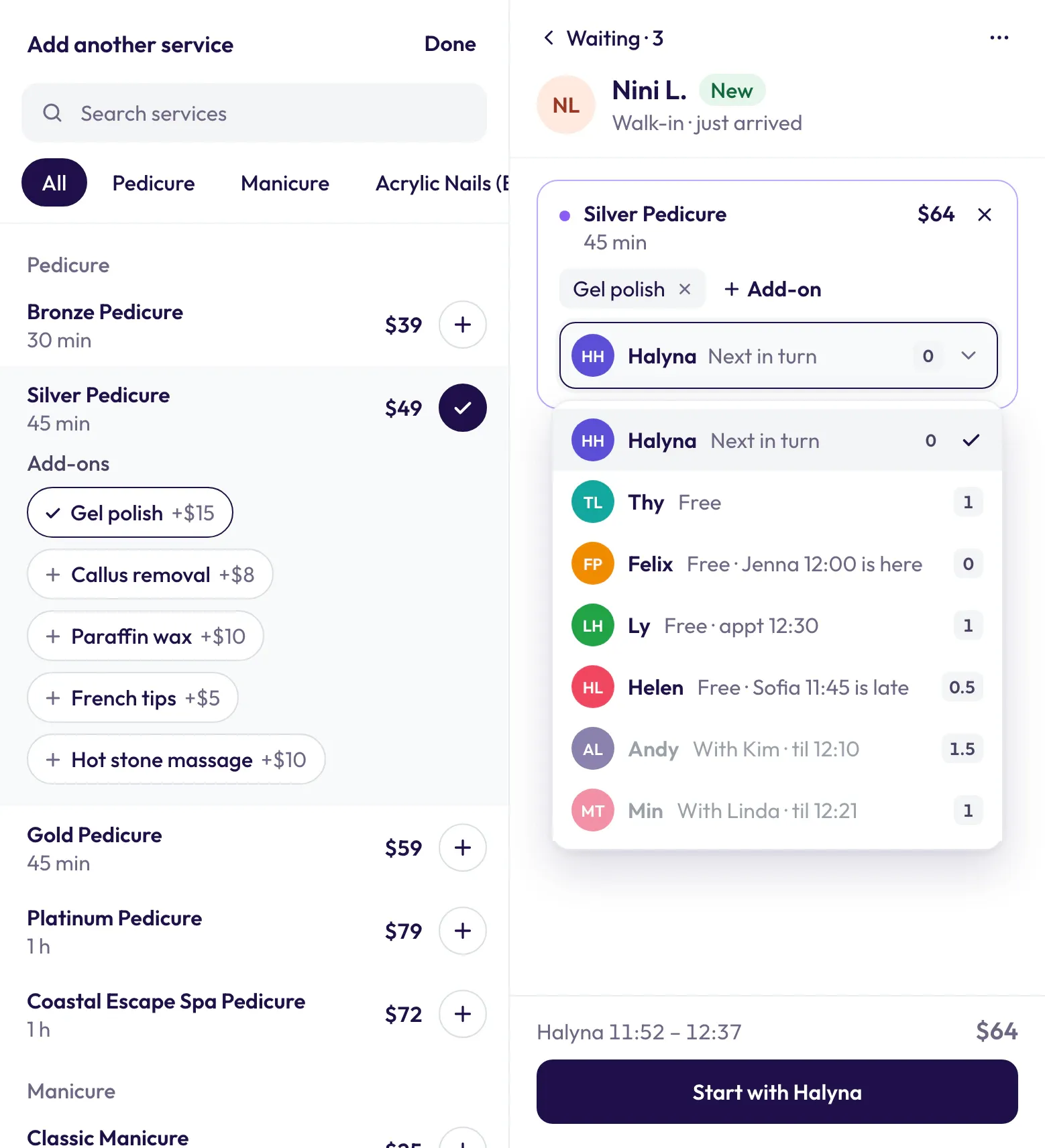
Tap a client in line and their ticket opens, with your services menu right beside it. Tap a service and its add-ons open right under it. The tech, the times and Start stay in view.
Want someone else? Tap the tech’s name on the ticket and pick anyone. A busy tech needs a second tap, so no one gets moved by mistake. Pick Thy anyway and the ticket warns you: “Thy has Anna at 2:55 — this runs to 3:15”. Every walk-in pick is saved for the Today report.
Walk-in not ready to start? Go back to the line. The services you picked stay on their ticket.
No guessing, no AI. The same rules every time, so your techs can trust it.
Online “Anyone” bookings
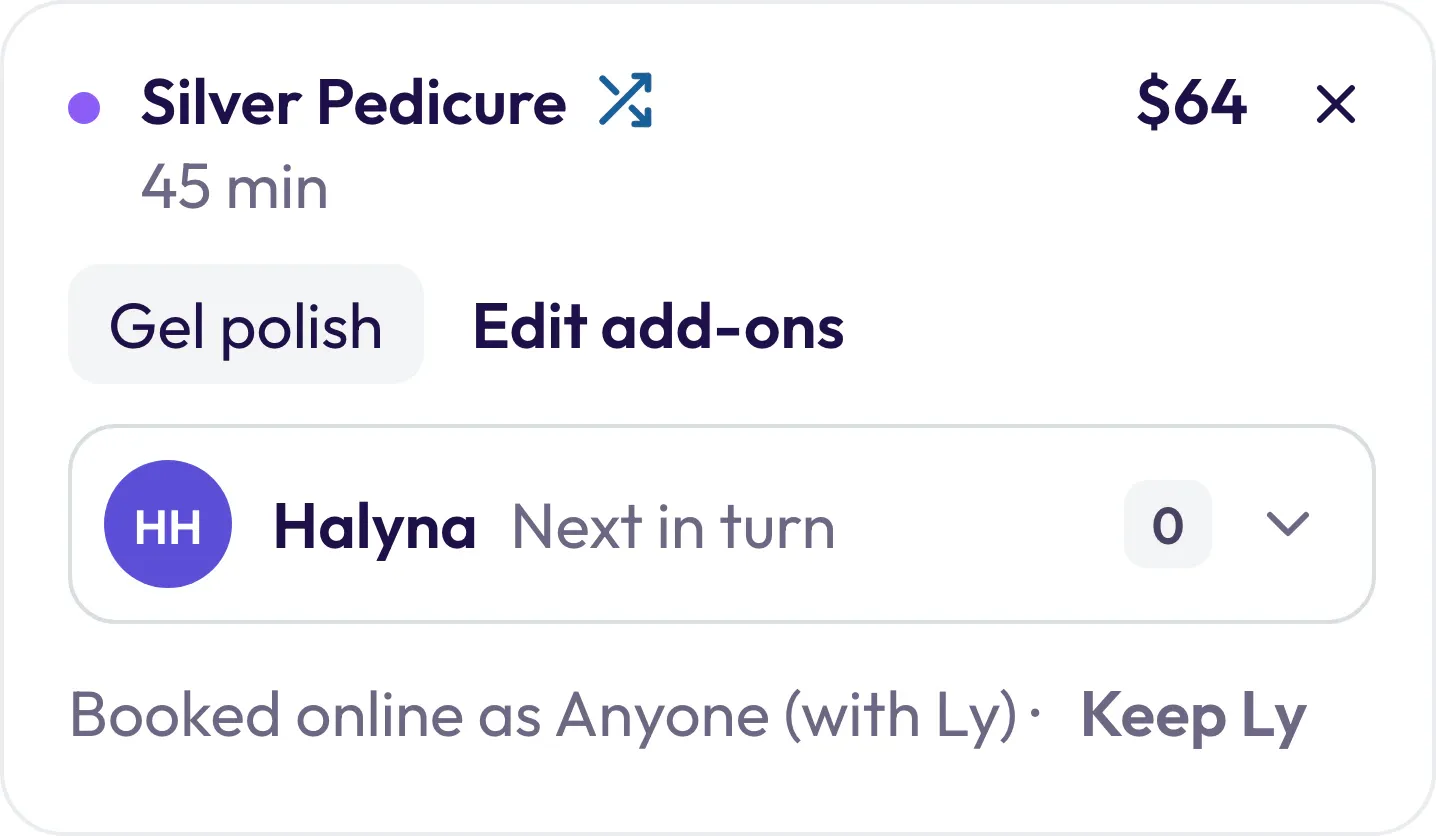
Booked “Anyone” online? They go to whoever’s turn it is.
When a client picks Anyone online, Hayven holds a real tech so the time is never double-booked. When the client starts, Turns offers the next tech in turn instead.
- Only Anyone bookings change. A client who picked a tech keeps her.
- When the visit starts, it moves to Min’s column on the calendar.
- Two services booked as Anyone stay with one tech when she has time.
Booked online as Anyone (with Ly) ·
Your turn rules
Your salon. Your turn rules.
Every salon counts turns a little differently. Set your rules once. Turns counts every visit your way.
- Simple or Advanced Simple: services under a price you pick count 0 turns, the rest count 1. Advanced: turns follow the price, with your own changes.
- A value for any service Give a service its own turn number for walk-ins and for appointments, plus a short label like “CB-Gel”.
- Requests count your way When a client books a tech or asks for her by name, the turn gets a ★. You choose how ★ turns count.
- Close counts can tie In Advanced mode, turn equivalence treats techs with close turn counts as equal, so sign-in order decides.
- Guard the line A 6-digit passcode protects Start over, Sign out and moving techs up or down.
With your settings
- Olivia · Gel Manicure $45 walk-in
- 1T 1T 1T 1T
- Anna · Deluxe Manicure $50 ★ booked Thy
- 1T 0.5T 0.5T 0T
- Polish Change – Hands $17 under $35
- 0T 0T 0T 0T
With your settings: Olivia · Gel Manicure $45, 1T; Anna · Deluxe Manicure $50, 1T; Polish Change – Hands $17, 0T
With your settings: Olivia · Gel Manicure $45, 1T; Anna · Deluxe Manicure $50, 0.5T; Polish Change – Hands $17, 0T
With your settings: Olivia · Gel Manicure $45, 1T; Anna · Deluxe Manicure $50, 0.5T; Polish Change – Hands $17, 0T
With your settings: Olivia · Gel Manicure $45, 1T; Anna · Deluxe Manicure $50, 0T; Polish Change – Hands $17, 0T
Turns adds the ★ by itself when a visit starts. No more marking “appointment” by hand.
The board
One look. The whole salon.
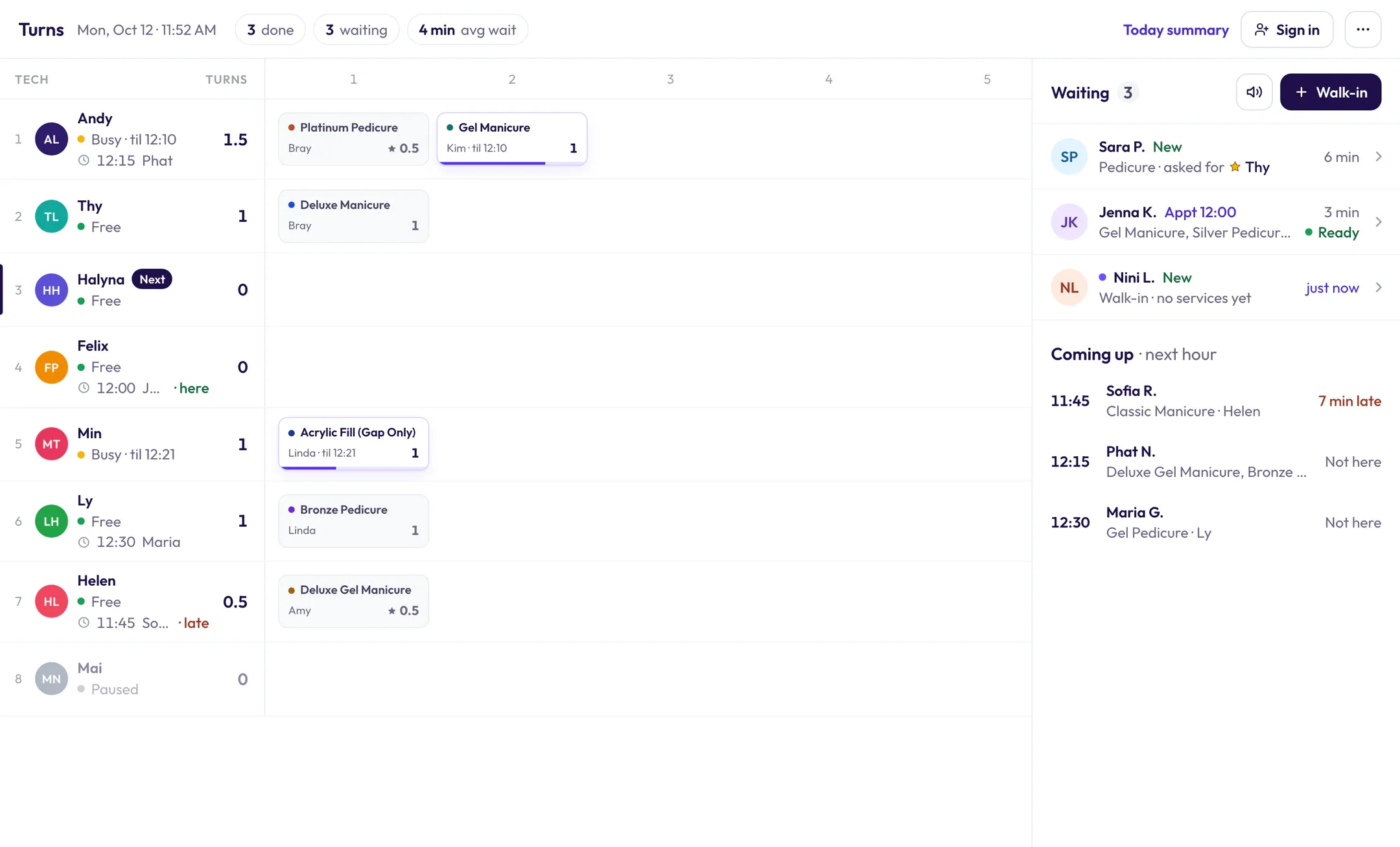
Who’s waiting, who’s coming, who’s busy and until when. Plain words, no codes to learn.
Turns
- 6 done
- 2 waiting
- 9 min avg wait
- T Thy busy until 12:40 1 turn
- Kids Manicure Sofia 0
- Gel Manicure Hannah · til 12:40 1 New client · 10% OFF
- H Helen 5 minutes over 12:15 Vy · late 2 turns
- Gold Pedicure Amy 1
- Gel Manicure Kayla · 5 min over 1
- M Megan free 12:40 Hannah · here 2 turns
- Gel-X Full Set Nina 1
- Gold Pedicure Hannah · 12:40 1 New client · 10% OFF
- M Min free 12:15 Bella · here 2 turns
- Deluxe Manicure Rosa 1
- Skip +1
- L Ly Next free 1 turn
- Gel Manicure Mai 1
- Polish Change – Hands Linh 0 Free · Oct
- A Andy Not signed in 1:00 bookedSign in Andy
Waiting 2
- B Bella Appt 12:15 Gel Manicure · Min 5 min Ready
- Z Zoe New Gel Manicure · 10% OFF New Client Offer 2 min
Coming up · next hour
- 12:15 Vy Deluxe Manicure · Helen 5 min late
- 1:00 Joy Deluxe Manicure · Andy Not here
- “Waiting · 2” — Checked in, longest wait first. Tap a row to open the ticket.
- “Ready / Waiting on Thy” — A booked client’s tech is free, or not yet.
- “Coming up · next hour” — “5 min late” when they’re behind.
- “Busy · til 12:40” — Busy, and until when. The client’s name is on her cell.
- “5 min over” — Running over.
- “12:15 Bella · here” — Her next booking: “· here” once checked in, “· late” when behind.
- “Next” — Who’s up by your rules.
- “Hannah · 12:40” — Her part starts after another tech.
- “Not signed in · 1:00 booked” — Has a booking but hasn’t signed in. Tap “Sign in Andy”.
- “New client · 10% OFF” — A New Client Offer on today’s visit.
- “Free · Oct” — A free prize visit.
- “Paused” — On a break, never suggested.
- “6 done · 2 waiting · 9 min avg wait” — Today so far, at the top of the board.
Bigger visits
Two techs, one client. No mix-ups.
Each service on a visit can have its own tech. Turns counts each one and knows who’s next.
Same-time visits are a setting you turn on.
11:00 AM · Mia, walk-in Example
The Eyebrow Wax is under $35, so it adds 0 turns.
3:10 PM · Jess, booked same time Example
Waiting 1
- J Jess Appt 3:10 Deluxe Manicure, Gold Pedicure · Ly + Megan 2 min Waiting on Megan
Tap the row, and her ticket opens.
One after another Same time
Tap Megan’s name to swap in Helen, who’s free.
11:42 AM · Thy taps Done on Mia’s Gel-X Full Set Example
Thy is done with Mia · Helen next (Eyebrow Wax)
- T Thy free 3 turns
- Gel-X Full Set Mia 1
- H Helen busy until 11:57 2.5 turns
- Eyebrow Wax Mia · til 11:57 0
Thy’s calendar · Mia · Gel-X Full Set · 11:00 – 11:42
Turns + calendar
Do it on Turns. The calendar already knows.
Turns and your calendar talk both ways. Nobody types a visit twice.
Helen: busy until 5:31. Chloe 4:46 – 5:31, In Service.
Helen: busy until 5:31. Chloe 4:46 – 5:31, In Service. Helen busy until 5:31
Helen: free. Chloe 4:46 – 5:15, Done.
Helen: free. Chloe 4:46 – 5:15, Done. Helen free 5:15 – 6:30
On Turns
- H Helen busy until 5:31 6:30 Ella 6 turns
- Deluxe Manicure Chloe · til 5:31 1
- H Helen free 6:30 Ella 6 turns
- Deluxe Manicure Chloe 1
What online booking sees Helen busy until 5:31
What online booking sees Helen free 5:15 – 6:30
On the calendar · Helen’s column
It works the other way too. Check in, Start or Done on the calendar, and Turns already has it.
Every iPad and computer at the desk shows the change the moment it happens. Taps answer right away.
See how the calendar worksToday report
Proof that ends turn arguments.
When the desk starts a walk-in, Hayven saves who it suggested and who the desk picked. The Today report shows it for each tech.
| Tech | Clients | Requested | From the line | Manual picks | Turns |
|---|---|---|---|---|---|
| T Thy | 9 | 3 | 6 | 0 | 9 |
| M Megan | 9 | 2 | 7 | 1 | 8 |
| H Helen | 8 | 1 | 7 | 2 | 8 |
| M Min | 8 | 2 | 6 | 0 | 7 |
| L Ly | 7 | 1 | 6 | 1 | 7 |
Requested = booked with or asked for this tech (counted by your Appointment & request rule).
Manual picks = turns the desk gave to a tech other than the suggested one.
- Avg walk-in wait 9 min Longest 23 min, at 2:10 PM
- New clients 6
- No-shows 1
A tech asks why she got fewer walk-ins? Open today’s report together. It’s all there.
Compare
A separate turn app vs. Hayven
| At the desk | A separate turn app | Hayven Turns |
|---|---|---|
| A tech has a client soon | The desk checks the calendar and does the math | Passed this time, keeps her place |
| A client checks in | The desk types them in | Joins the line with a chime |
| Who can do the service | The desk remembers | Only techs set up for every service |
| Requested clients | Marked “appointment” by hand | ★ counted by your rule |
| Online “Anyone” bookings | The desk looks them up | Offered to whoever’s turn it is at Start |
| A walk-in starts | The desk adds it to the calendar, or online can book that time | A real calendar block online can’t sell |
| A tech finishes early | The calendar still shows her busy | Done ends her time, the rest goes back on sale |
| Hands + feet together | Worked out by hand | “Start now · Megan joins at 3:15” |
| New Client Offer | The desk has to ask | On the waiting line and the turn |
| Turn arguments | Nothing to check | The Today report |
-
A tech has a client soon
- A separate turn app
- The desk checks the calendar and does the math
- Hayven Turns
- Passed this time, keeps her place
-
A client checks in
- A separate turn app
- The desk types them in
- Hayven Turns
- Joins the line with a chime
-
Who can do the service
- A separate turn app
- The desk remembers
- Hayven Turns
- Only techs set up for every service
-
Requested clients
- A separate turn app
- Marked “appointment” by hand
- Hayven Turns
- ★ counted by your rule
-
Online “Anyone” bookings
- A separate turn app
- The desk looks them up
- Hayven Turns
- Offered to whoever’s turn it is at Start
-
A walk-in starts
- A separate turn app
- The desk adds it to the calendar, or online can book that time
- Hayven Turns
- A real calendar block online can’t sell
-
A tech finishes early
- A separate turn app
- The calendar still shows her busy
- Hayven Turns
- Done ends her time, the rest goes back on sale
-
Hands + feet together
- A separate turn app
- Worked out by hand
- Hayven Turns
- “Start now · Megan joins at 3:15”
-
New Client Offer
- A separate turn app
- The desk has to ask
- Hayven Turns
- On the waiting line and the turn
-
Turn arguments
- A separate turn app
- Nothing to check
- Hayven Turns
- The Today report
FAQ
Questions from the front desk
Do I need to buy an iPad or kiosk from Hayven?
No. Hayven doesn’t sell hardware. Use an iPad you already own, a printed QR poster, or the check-in text. The iPad and the poster work together.
Does Hayven give clients to techs by itself?
No. Hayven suggests a tech and shows why. Your desk checks the ticket and taps Start, and can always pick someone else. The Today report shows those picks.
Is it AI?
No. Turns uses the same clear rules every time: signed in, does every service, fewest turns, free, and done before her next client. Your techs can see why someone was suggested.
What if a tech has a client booked soon?
Hayven adds her own time for the service plus 5 minutes. If that runs past her next booking, she is passed this time and keeps her place. A short service that fits can still go to her.
What if a booked client is late?
After 15 minutes without checking in, the client stops holding the tech. Once the client checks in, the tech is held again.
Can I keep the way my salon counts turns?
Yes. Pick Simple or Advanced, give any service its own turn number, choose how ★ requests count, and guard the line with a passcode.
Do my techs need an app?
No. The board runs on any iPad or computer in the salon, and every screen shows the same board. On smaller screens the services menu opens inside the ticket.
Does it work with my POS?
Yes. Your POS keeps payments. Done on Turns closes the visit on the calendar. Then ring it up at your POS like always.
What languages does check-in speak?
The kiosk and the poster speak English and Spanish. Our team helps you in English and Tiếng Việt.
Is Turns on for every salon?
Turns and self check-in are switches. We turn them on with you and set up your techs, services and turn rules.
What about a walk-in who doesn’t check in?
The desk taps “Walk-in” on the waiting line, or the + on a tech’s row.
See Turns run a real afternoon.
Book a demo. We’ll walk through a salon day like yours, then set up your techs, services and turn rules with you.
Our demo form needs JavaScript. You can also call, text, or email us and we’ll set it up: