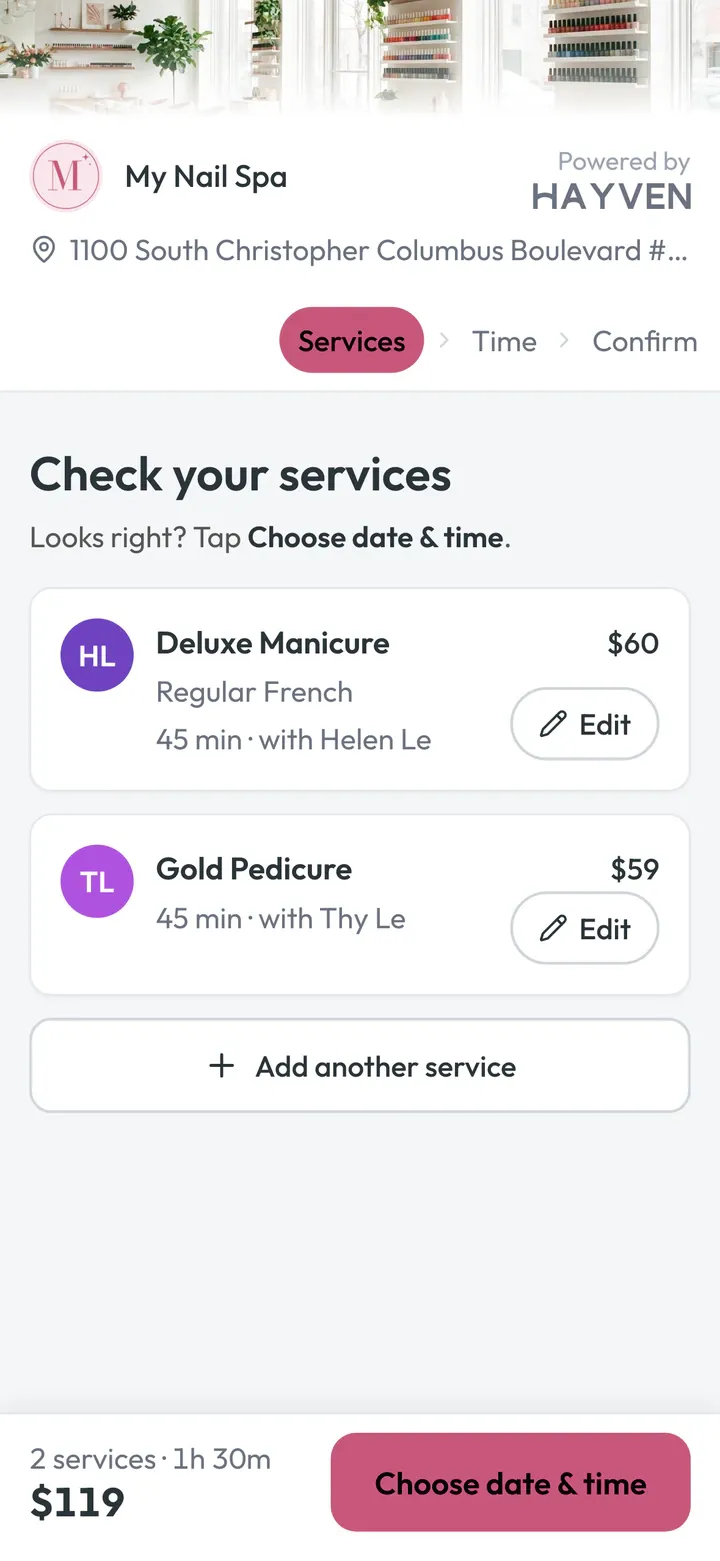
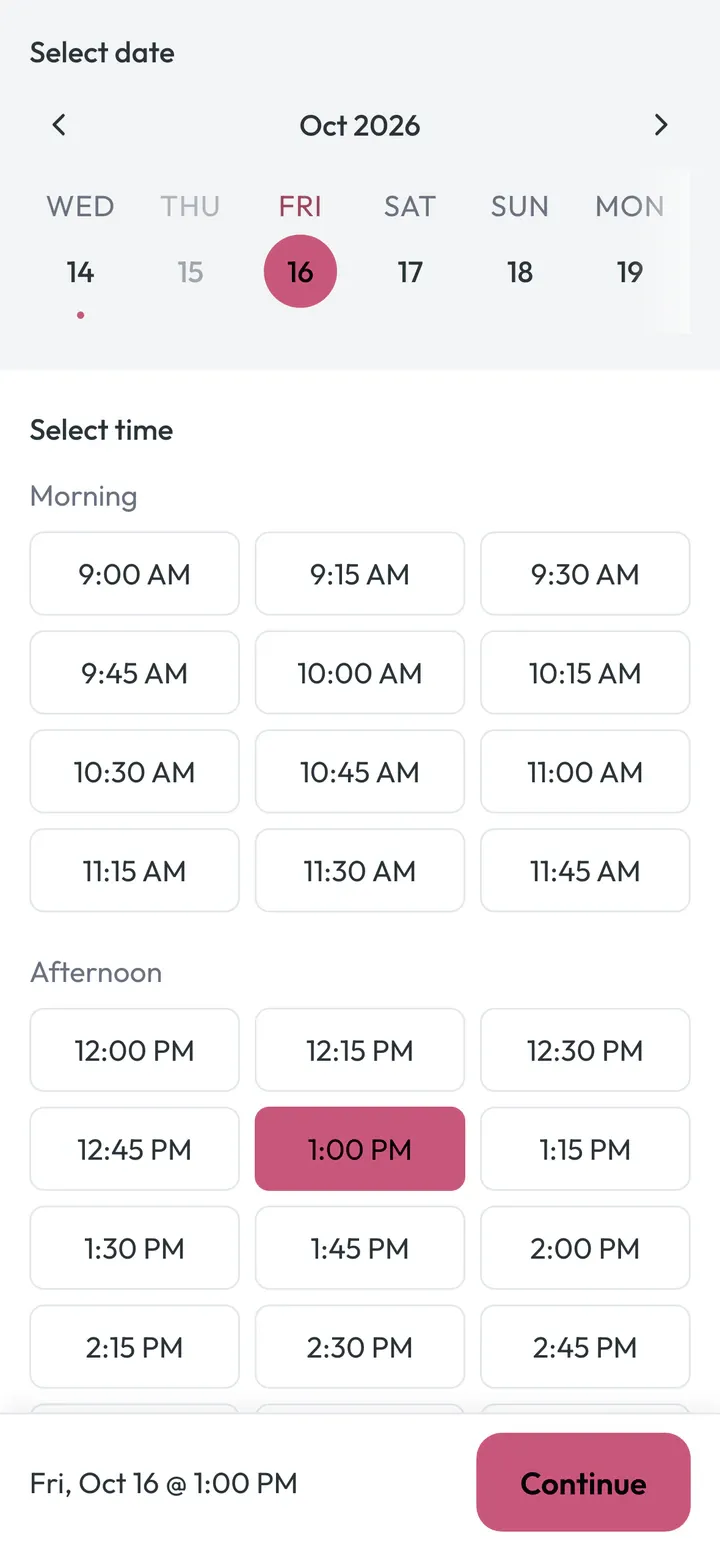
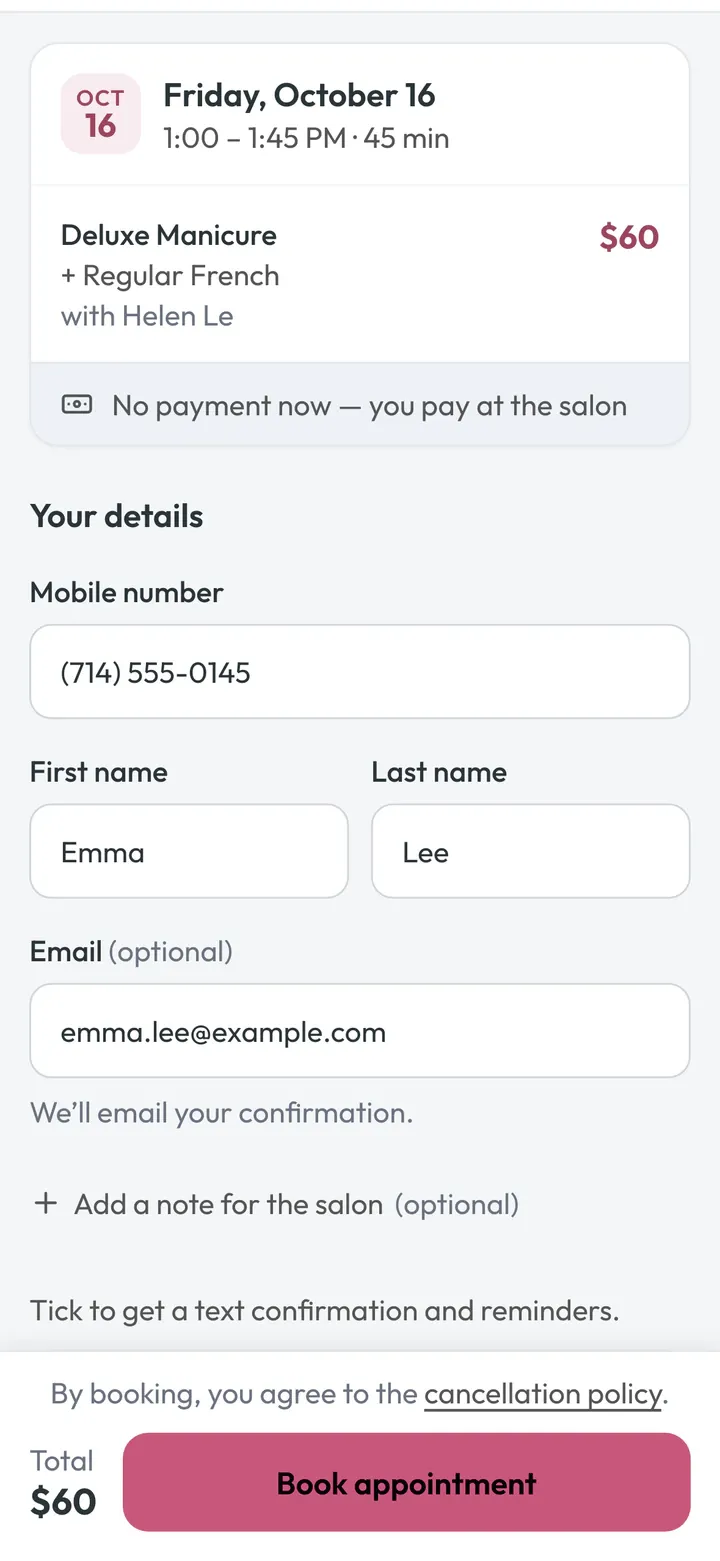
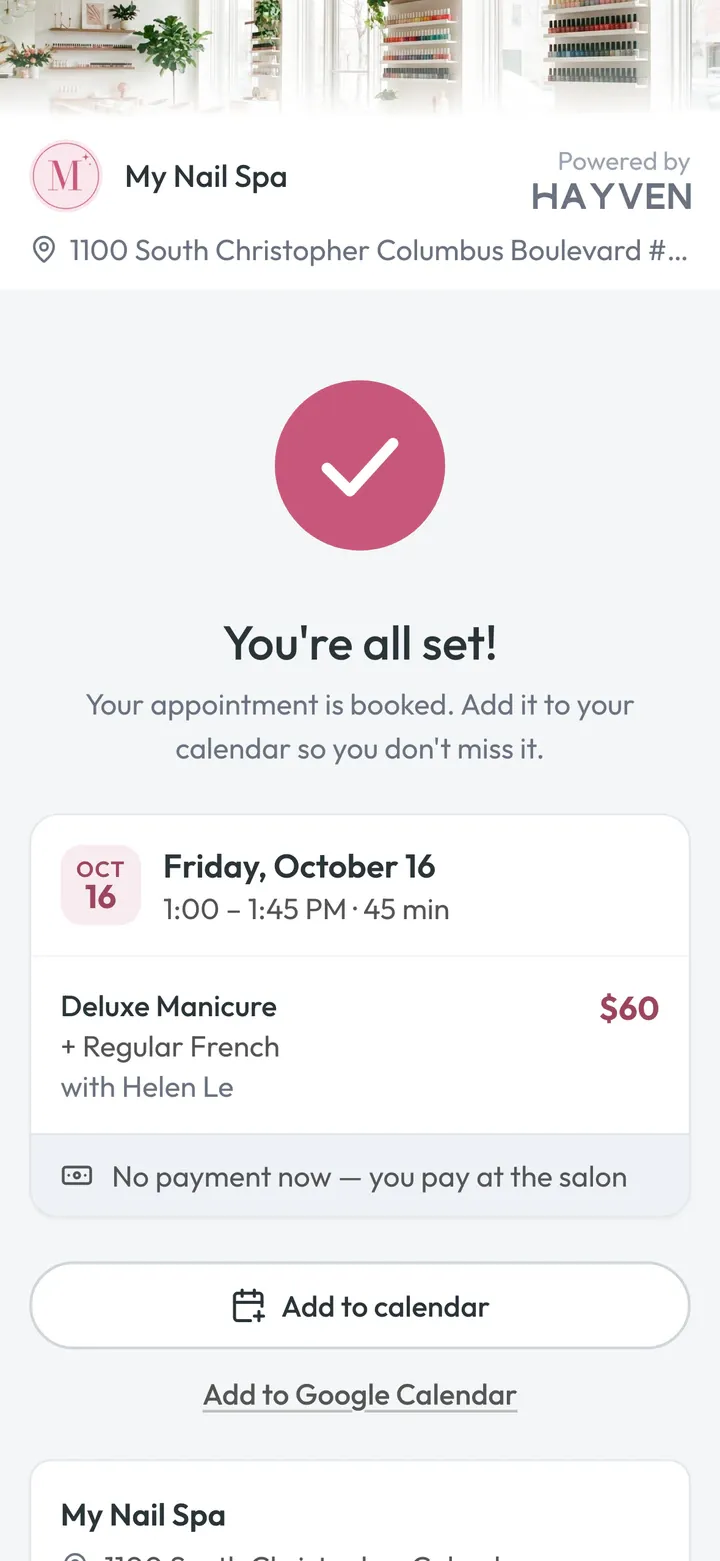
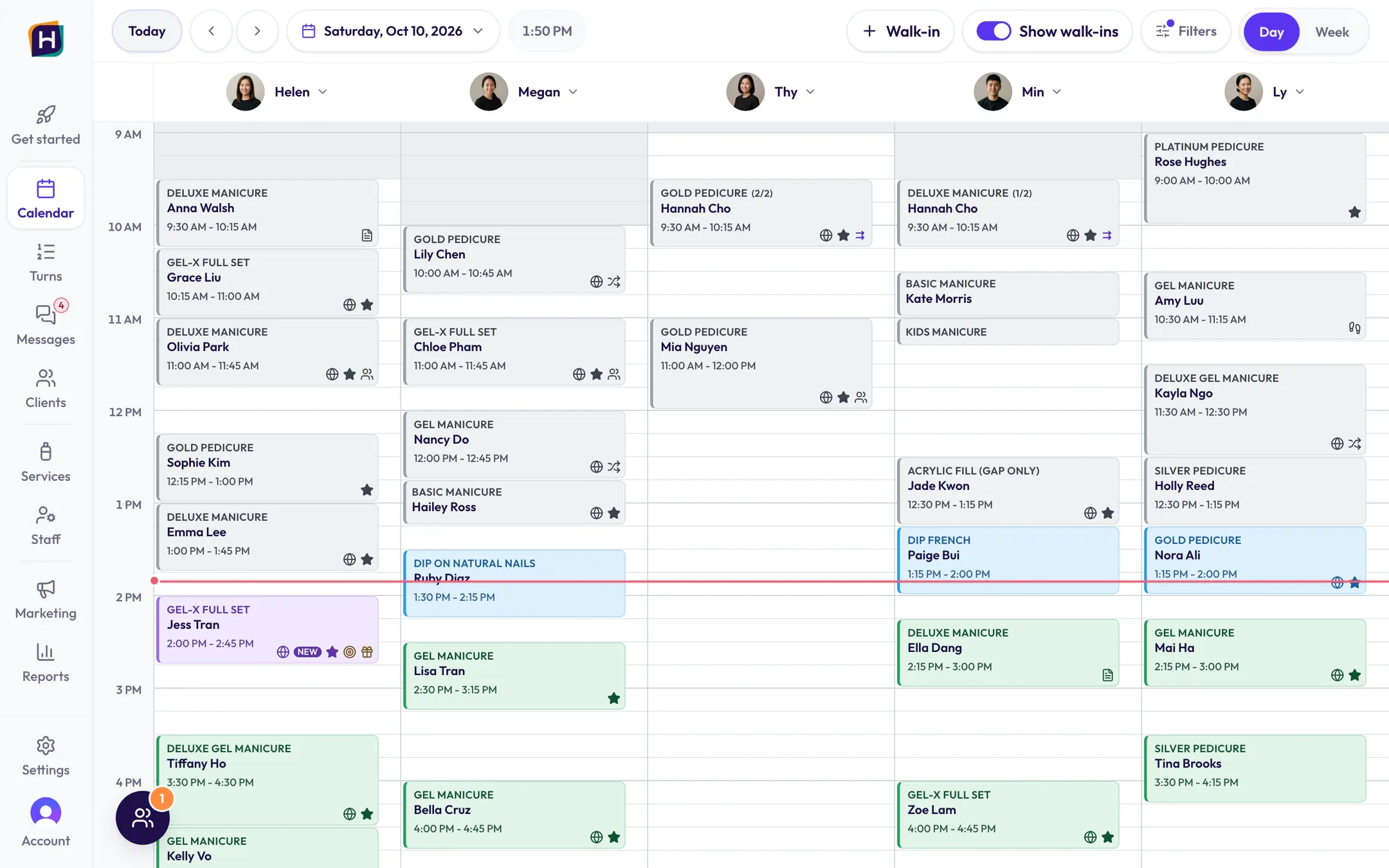
Clients pick the service, the add-ons, the tech and the time. No account, no password. Every booking lands on a real tech’s column, and your calendar, Turns and marketing know about it right away.
Helen · Sat 2:00 PM JessGel-X Full Set + Cat EyeNEW
ExampleJess booked from your Gel-X Fall Special. Helen’s 2:00 is hers. Nobody typed a thing.
The booking page
Your POS is great at payments. Its booking page? Not so much.
Many POS booking pages feel like 2010: tiny menus, forced sign-ups, and an “Add-ons” category nobody scrolls down to find. Clients give up and call. Or they book “Manicure,” then ask for gel removal, nail art, and French tips at the front desk, and the whole afternoon runs late.
booking.hayven.ai/alphanailspa
MMy Nail Spa Powered byHayven
ServicesTimeDetails
Saturday, October 101:00 PM
Deluxe Manicure · 45 min+ Regular FrenchHwith Helen
$60
Mobile number (555) 555-0142
First nameEmma
Last nameNguyen
Email emma.nguyen@example.com
Please give us 24 hours’ notice if you need to cancel or reschedule.
‹›↻/OnlineBooking/Step1.aspx?loc=48213&view=all
Book an AppointmentHome | Services | Gift Cards | Contact Us
1. Service2. Staff3. Date & Time4. Your Info5. Confirm
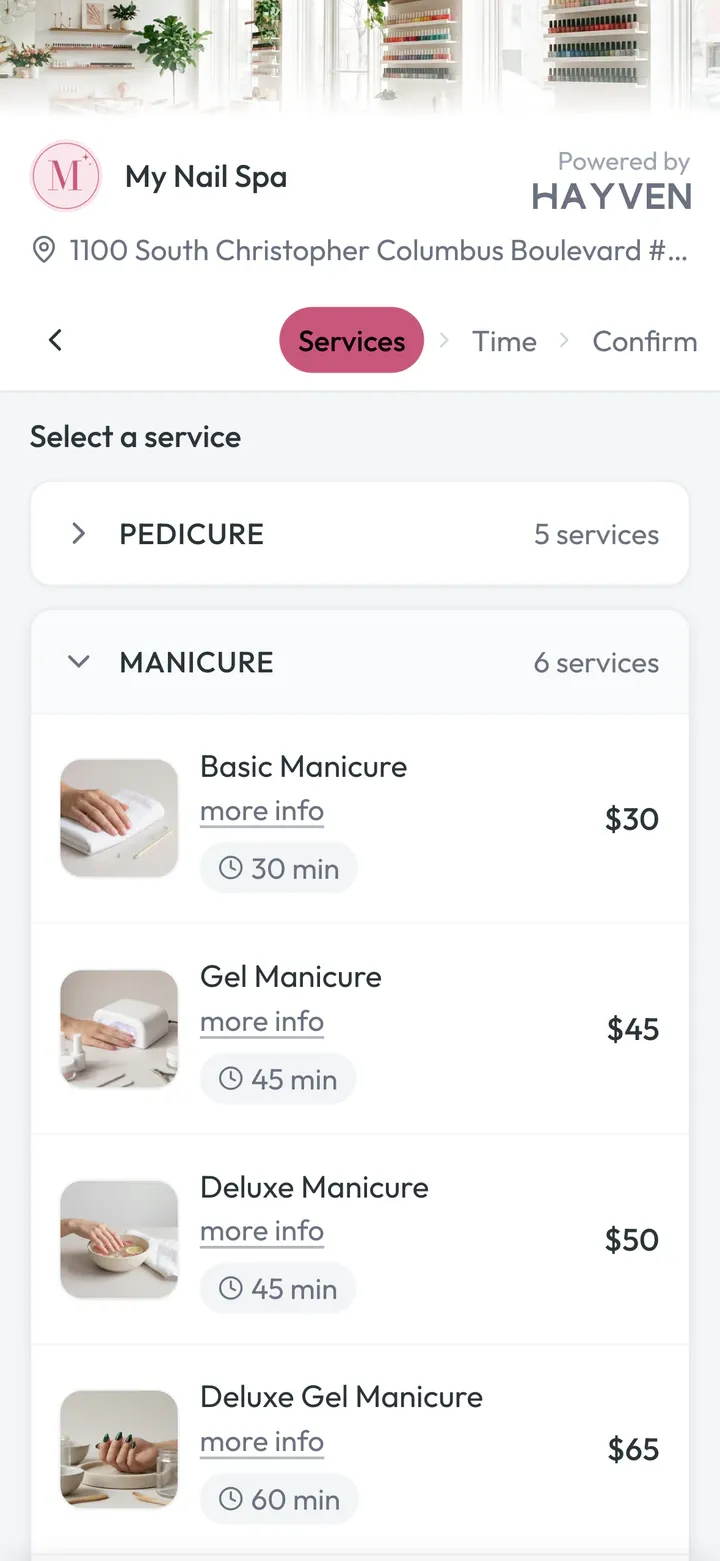
Your logo, your color, your menu with prices. Change a price in Hayven and your booking page updates on its own.
9:41
MMy Nail SpaPowered byHayven
Manicure 2 services
Deluxe Manicure 45 min
$50
Basic Manicure 30 min
$30
Pedicure 1 service
Gold Pedicure 45 min
$59
Booked right the first time
They book exactly what they want.
Three small choices fix three big front-desk headaches: surprise add-ons, the wrong tech, and no good times.
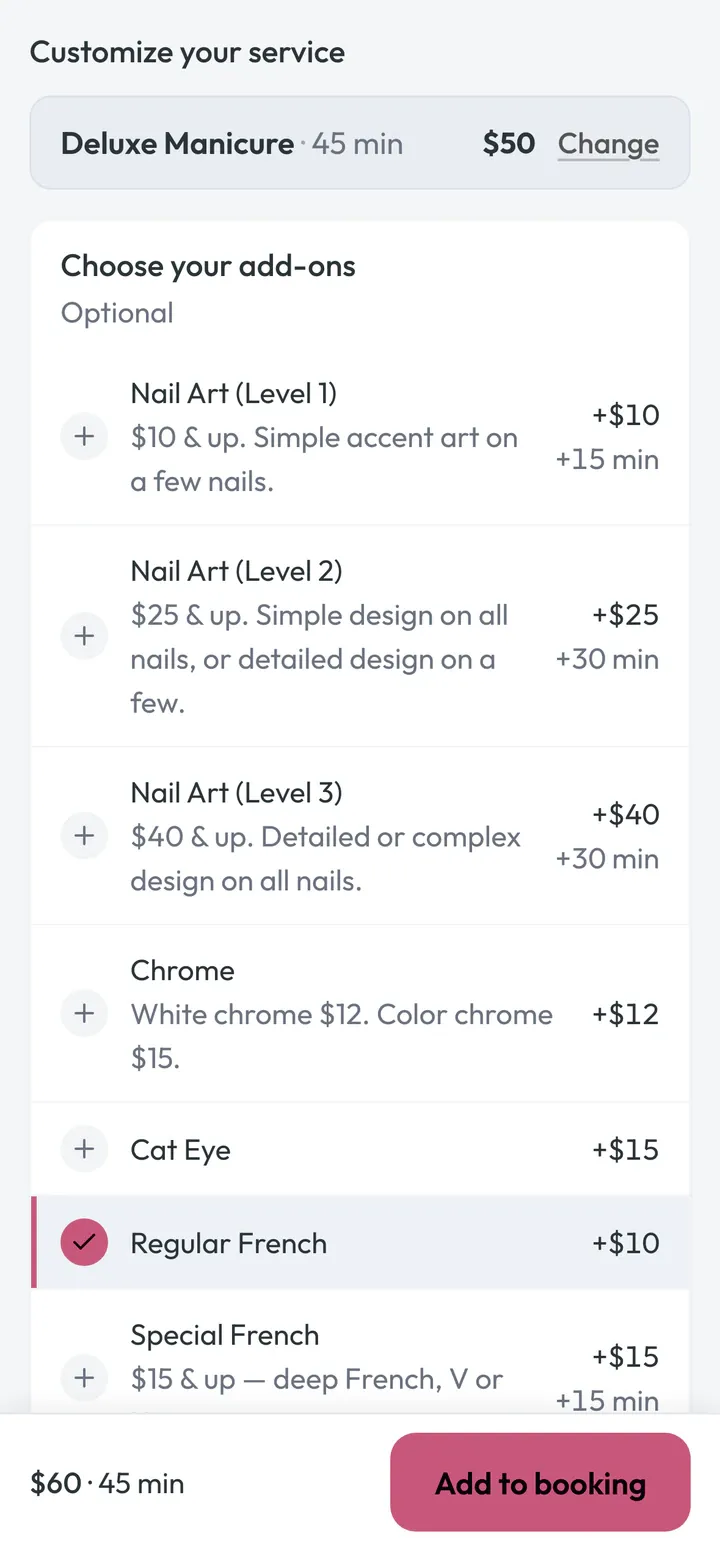
Add-ons right after the service they go with.
Many booking pages hide add-ons in a list at the bottom. Hayven asks right after the client taps a service. The price and time update as they tap. You sell more, and your calendar holds the right amount of time.
Only the add-ons that fit that service
Price and time update with every tap
If a tech doesn’t do an add-on, she isn’t offered for it
Must-pick choices are checked before they move on
Add-ons show when clients choose a tech for each service, the default way to book.
Example
Customize your service
Gel-X Full Set · 45 minFrom $60
Choose your add-ons
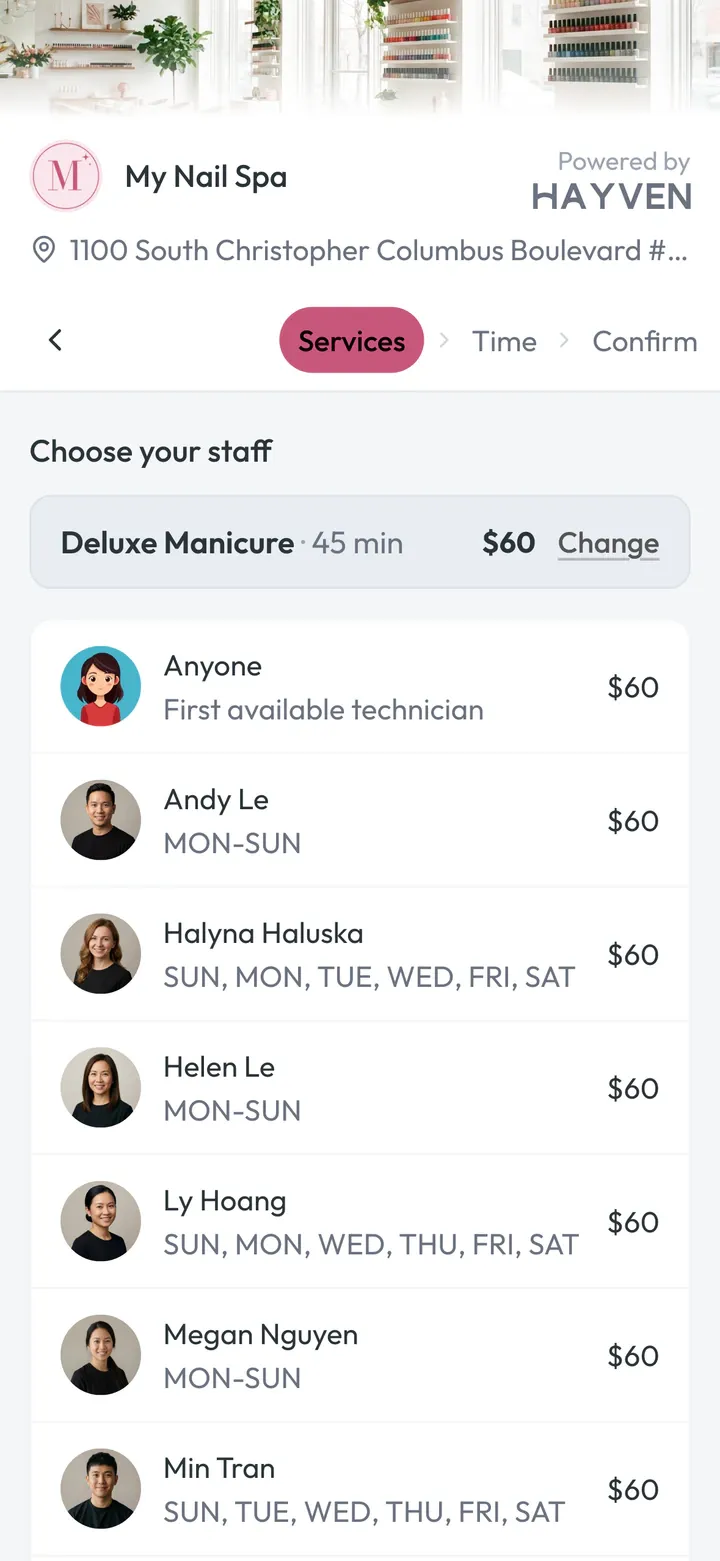
A tech for each service. An earlier time.
Jess wants a Gel-X Full Set and a Gold Pedicure on Saturday. If one tech has to do both, the first open time is 3:30 PM. Let each service have its own tech, and she starts at 1:00 PM and is done by 2:30 PM.
Each service gets its own tech, or Anyone
Each tech can have her own price; Anyone shows the range
Prefer one tech per visit? It’s one setting.
Jess · SaturdayExample
How Jess books
One tech for the whole visit · First open time 3:30 PM
Megan · both services
A tech for each service · Starts 1:00 PM, done by 2:30 PM
HelenThy
1 PM2 PM3 PM4 PM5 PM
Hands and feet at the same time.
A manicure and a pedicure with two techs, side by side. Clients choose on the Time step: one after another, or at the same time. A shorter visit for them. A fuller hour for you.
Asked once, on the Time step
Both techs sit side by side on your calendar
Check-in and Turns know it’s one visit
You pick which services are hands or feet. We pre-fill them from your service names.
Girls’ day? Bridal party? Book the whole group at once.
Up to five guests in one online booking. Each person picks their own services, add-ons, and technician. Hayven finds one start time that works for everyone, with real technicians assigned so nobody gets double-booked. Then one person can manage the whole group.
On many POS booking pages, a group books one person at a time and hopes the times line up. Usually they don’t, so they call.
O
Olivia Organizer
Deluxe Manicure + Regular French
H Helen
M
Mia
Gold Pedicure + Gel Polish
T Thy
C
Chloe
Gel-X Full Set
M Megan
A
Ava
Kids Manicure
M Min
Finding a time for all 4… Sat 11:00 AM works for everyone
My Nail SpaSaturday, Oct 10
H Helen T Thy M Megan M Min
10 AM 11 AM 11 AM 12 PM
Grace
Sophie
Olivia Deluxe Manicure
Hannah
Mia Gold Pedicure
Nancy
Chloe Gel-X Full Set
Kate
Jade
Ava
Group summaryExample
Saturday, Oct 10 · 11:00 AM
OOlivia Deluxe Manicure + Regular French · Helen · ends 11:45 AM$60
Example: Olivia, Mia, Chloe, and Ava book together for Saturday, Oct 10 at 11:00 AM, each with their own service and technician. Group total $214.
Every guest picks their own services, add-ons, and technician
One start time that works for the whole group, checked against every technician’s real schedule
Per-guest prices and a group total before anyone books
Each guest gets their own confirmation and reminders. The organizer can cancel or move the group from one link.
At the front desk, the group shows up linked on your calendar. Tap any guest to see everyone.
You choose the maximum group size (2–5) and which services can be booked as a group.
Smart Anyone
Anyone gets a real tech. The fair one.
When a client picks Anyone, Hayven books a real, free tech right away. No make-believe “Anyone 1” column. No double-booking. And it keeps thinking after that.
The fair pick. Not the first name on the list.
Hayven checks, in this order:
1 Does she do this service, with these add-ons?
2 Is she free the whole time?
3 Is she already doing this client’s other service?
4 Would it leave a hole nobody can book?
5 Who has the least booked time today?
6 Still a tie? A fair random draw.
Never by name. Never by who’s been there longest.
You can keep someone off the list. Andy is the owner, so he only takes requests.
Nancy · Gel-X Full Set · Anyone · Sat 3:00 PM Example
H Helen4h 15m booked today
M Megan2h 30m booked today Nancy
T Thy3h booked today
M MinDoesn’t do Gel-X Full Set
L LyBusy at 3:00
A AndyKept off the list (owner)
Emma · Gel-X Full Set · Anyone · Sat 3:00 PM Example
H Helen4h 15m booked today
M MeganNow busy at 3:00 Nancy
T Thy3h booked today Emma
M MinDoesn’t do Gel-X Full Set
L LyBusy at 3:00
A AndyKept off the list (owner)
Kim · Gel-X Full Set · Anyone · Sat 3:00 PM Example
H Helen4h 15m booked today Kim
M MeganNow busy at 3:00 Nancy
T ThyNow busy at 3:00 Emma
M MinDoesn’t do Gel-X Full Set
L LyBusy at 3:00
A AndyKept off the list (owner)
Example
H HelenNow busy at 3:00 Kim
M MeganNow busy at 3:00 Nancy
T ThyNow busy at 3:00 Emma
M MinDoesn’t do Gel-X Full Set
L LyBusy at 3:00
A AndyKept off the list (owner)
Nancy gets Megan: she does Gel-X Full Set, she’s free the whole time, and she has the least booked time today.
Asked for Helen? We make room.
Olivia booked a Gel-X Full Set with Anyone and got Helen at 4:00. Then Tiffany books online and asks for Helen at 4:00. Megan is free and does the same service at the same price. Hayven quietly moves Olivia to Megan, and Tiffany gets Helen. Olivia keeps her time, her price and her length.
Hayven only moves a booking that was booked online as Anyone, starts 2 or more hours from now, hasn’t checked in, hasn’t been changed by your team, and isn’t part of a group. Requested bookings never move. Your desk sees: “Moved from Helen to Megan to honor a request.”
When Tiffany books
It’s 1:00, 4:00 is 3 hours away Example
Helen · 4:00 PM Tiffany ★ · Gel-X Full Set
Megan · 4:00 PM Olivia · Gel-X Full Set
Olivia moves to Megan. Same time, same price, same length. Tiffany gets Helen.
Booking Details · Moved from Helen to Megan to honor a request.
It’s 3:00, one hour away Example
Helen · 4:00 PM Olivia · Gel-X Full Set
Megan · 4:00 PM Free
Olivia stays: her visit is less than 2 hours away.
Tiffany’s phone: Helen’s next open time · 4:45 PM
Olivia asked for Helen ★ Example
Helen · 4:00 PM Olivia ★ · Gel-X Full Set
Megan · 4:00 PM Free
Requested bookings never move.
Tiffany’s phone: Helen’s next open time · 4:45 PM
At Start, it goes to whose turn it is.
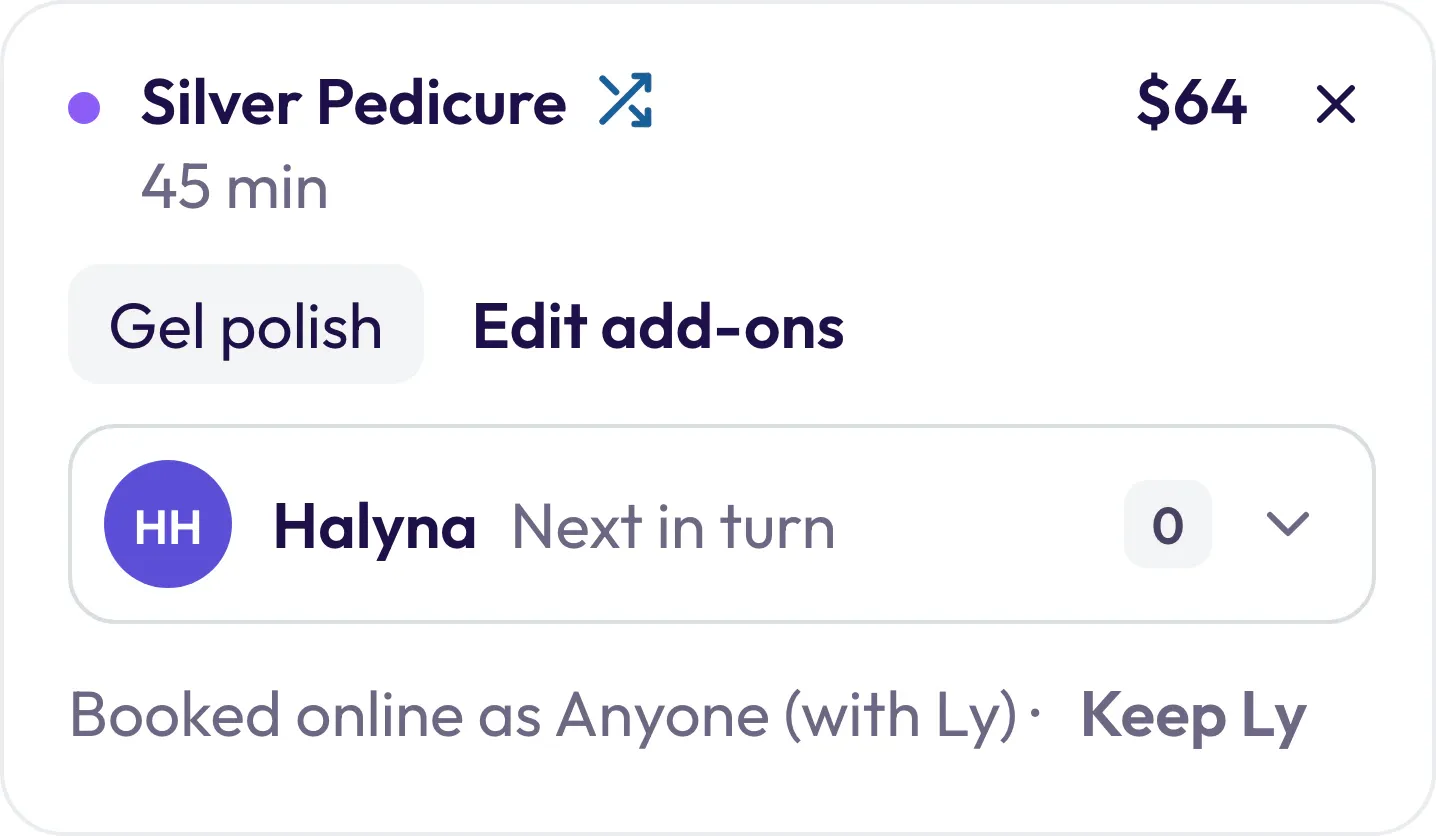
At salons that use Turns: Olivia arrives for her 4:00 Anyone booking. Megan is holding her, but Thy is next in turn. When your desk opens her ticket, Thy is already suggested. Want Megan anyway? One tap: “Keep Megan.” Then Start.
Online booking skips start times that would leave a hole too short to sell, next to another appointment, a break, or the start or end of a shift. Too short means shorter than your shortest online service, never more than 30 minutes. It only skips a time when other times work that day, so it never hides a whole day.
Helen’s Saturday afternoon · a client wants a 45-min Gel-X Full SetExample
Jess · 2:00 Tiffany · 4:00free 2:45 – 4:00
2:002:303:003:304:004:30
Example: a salon whose shortest online service is 30 minutes.
2:45 PMShown
3:00 PMWould leave 15 min nobody can book
3:15 PMShown
Same tech, one visit
Pick Anyone for a manicure and a pedicure, and Hayven tries to keep the client with one tech.
Deluxe Manicure · Anyone M Megan
Gold Pedicure · Anyone M Megan
No double-booking. Even in the same second.
Every online booking goes to a real tech’s column. Two clients tap Helen at 4:45 at the very same moment. Only one gets her. The other picks another time.
Sat 4:45 PM · HelenYou’re all set!
Sat 4:45 PM · HelenThat time was just booked. Please choose another available time.5:30 PM6:00 PM
Walk-ins count too. When your desk gives a walk-in to Thy on Turns, that time comes off your booking page.
They can move it themselves. Your phone stays quiet.
Every booking text has a link to reschedule or cancel, inside the window you choose. Reminders go out on their own.
MMy Nail Spa
Appointment Details
Service
Deluxe Manicure
Date
Saturday, October 10, 2026
Time
12:00 PM – 12:45 PM
With
Helen
RescheduleCancel Appointment
Kim · Deluxe Manicure with Helen · Sat 12:00 PMExample
Right after bookingMon, Oct 5
You're all set! You have an appointment at My Nail Spa on Saturday, October 10 at 12:00 PM. … Click here to reschedule or cancel: link
2 days beforeThu, Oct 8 · 9:00 AM
Reminder: Your appointment at My Nail Spa is Saturday, October 10 at 12:00 PM. … Click here to reschedule or cancel: link
1 day beforeFri, Oct 9 · 9:00 AM
Reminder: Your appointment at My Nail Spa is tomorrow, October 10 at 12:00 PM. … Click here to reschedule or cancel: link
Same day, about 3 hours beforeSat, Oct 10 · 9:00 AM
Reminder: Your appointment at My Nail Spa is today, October 10 at 12:00 PM. … Click here to reschedule or cancel: link
15 minutes beforeSat, Oct 10 · 11:45 AM
Your appointment starts soon. When you arrive, please check in here: link
After the visit is DoneSat, Oct 10 · 1:45 PM
Hi Kim! Thanks for visiting My Nail Spa. If Helen did a great job, a quick Google review would mean a lot to us: link
A link in every booking text and reminder
They can move or cancel up to 24 hours before. You choose: up to 48 hours, or never.
Closer than that? The page shows your phone number.
A requested tech stays with them when they reschedule.
Reminders move with the new time.
Texts go to clients who say yes to texts when they book. Everyone else gets their confirmation by email, if they gave one. Your texting number needs carrier approval first. We set that up with you.
A card holds the chair. Your desk decides the fee.
Clients save a card when they book. Nothing is charged. If they don’t show up, or cancel too late, your front desk can charge your fee with one tap. Hayven never charges on its own.
1 Online
Hold your spot with a card
Cancel at least 24 hours ahead. Late cancellation: $15. No-show: $20. Your card is saved securely by Stripe and isn't charged when you book.
Apple PayGoogle Pay
Card numberMM / YYCVC
I agree to the cancellation policy and allow My Nail Spa to charge this card for a late cancellation or no-show on this or future appointments.
No charge today. Your card is only charged if you cancel late or don’t show up.
Saved securely by Stripe
Book appointment
Clients see your policy before they book.
2 Booked by phone
Emma’s phone · Thu, Oct 8 · 10:02 AM
You're all set! You have an appointment at My Nail Spa on Saturday, October 10 at 1:00 PM. … Click here to reschedule or cancel: link
Please add a card to hold your spot (no charge today): link
Emma’s appointment panel · Card
Card requestedTexted Thu, Oct 8 at 10:02 AMResend
Mastercard •••• 4444Added Thu, Oct 8
Desk bookings get an “add your card” link with the confirmation. Your desk can skip it for a regular.
3 Saturday 3:00 PM
NNancyNo Show
Gel-X Full Set · Megan · 3:00 PM
No-show fee$20
Visa •••• 4242Decide by Tue, Oct 13
Waive
Charge Nancy’s no-show fee?
Amount$20.00Up to $20 under your policy · Visa •••• 4242
Text Nancy a receipt
One tap. A person decides, every time.
4 The receipt
Nancy’s panel
Charged $20 · Visa •••• 4242By Andy · 5:10 PM · receipt texted to Nancy
Refund
Nancy’s phone · Sat, Oct 10 · 5:10 PM
My Nail Spa: We missed you at your 3:00 PM appointment on Sat, Oct 10. Per our policy, a $20.00 no-show fee was charged to your Visa ending 4242. Questions? Just reply to this text.
Tap “Charge $20” in step 3 to see what happens next.
The client gets a receipt by text.
1 of 4
Example My Nail Spa’s own fees. You choose yours.
Online and desk bookings. Walk-ins never need a card.
A person always decides: charge, waive, or mark it paid at your POS. Never automatic.
Only the people you allow can charge or refund. The owner always can.
You set the fees: a flat amount or a share of the booked services. Your desk can charge less, never more.
Cancelling late from their text link? Clients see the fee and confirm first. Rescheduling never costs a fee.
Card declined? Their next visit shows “Owes $20 no-show fee from Oct 10”, so your desk can collect it at your POS.
Changed your mind? You can refund it.
Works beside your POS. Fees go to your salon’s own Stripe account. Off until you turn it on. We set it up with you.
Keep your POS for payments. In Hayven, your desk taps Done or No-show. The calendar does the rest.
10:15 AM
Thy takes a walk-in on Turns. A walk-in card appears in her column, and its panel reads “Walk-in · from Turns.” Online booking won’t sell that time.
Thy’s column
Walk-in · from TurnsBasic Manicure · 10:15–10:45 AM
10:40 AM
Move Emma from Helen to Megan: drag, check, Save. Groups and hands-and-feet pairs move together. After hours? The calendar warns you. It never blocks you.
Emma · Deluxe Manicure + Regular French1:00 PM
H→MMegan
Save Changes
2:30 PM
Helen finishes Jess 15 minutes early and taps Done. The rest of her slot goes back on your booking page.
Helen’s column
Jess · DoneGel-X Full Set + Cat Eye · 2:00–2:30 PM
2:30–2:45 PM · back on your booking page
2:30 PM
Your desk rings Jess up on your POS with the summary Hayven copies for you.
Ring up at your POSCopy
ClientJessCopy
Helen$75.00
Gel-X Full Set$60.00
+ Cat Eye$15.00
Total$75.00
Before tax and tip
Marked as DoneUndo
3:00 PM
No-show waits for the start time. Before 3:00 it reads “No-show (from 3:00 PM)”.
Nancy · Gel-X Full Set3:00 PM · Megan
No-show (from 3:00 PM)Check in
Closing
Forgot to tap Done? Hayven marks it Done for you: 30 minutes after the visit ends, or after closing time if the client is still in a Turns chair. The review text still goes out.
Hana · DoneGold Pedicure · 3:00–3:45 PM
Marked Done automatically at 4:15 PM
Done also counts the New Client Offer, the promo’s value and the Google review ask.
Every switch changes how clients book. No decoration. We set them up with you.
How clients choose technicians
A technician for each service, or one technician for the whole visit.
A technician for each serviceRecommended
Show “Anyone” option
Clients can skip picking and get a real, free tech.
On
Who gets “Anyone” clients
Balance the workload, or randomly.
Balance the workloadRecommended
Never give “Anyone” clients to
Keep the owner or a trainee for requests only.
Andy
Free up requested technicians
Move an online Anyone booking to make room for a request.
On
Shuffle technician order
So no one always sits at the top of the list.
On
Time restrictions
How far ahead clients can book, and how soon.
90 days · 15 minutes
Cancel & reschedule
Until when clients can change it themselves.
Up to 24 hours before
Same-time services
Hands and feet at the same time, with two techs. Off until you turn it on.
Off
Online group booking
Off until you turn it on. Up to 5 guests.
Off
Per tech
Online on or off, her own price and time.
Helen · $65 · 45 min
Smart scheduling
Nothing to set.
Always on
Compare
A typical POS booking page vs Hayven.
A typical POS booking page vs Hayven.
Topic
A typical POS booking page
Hayven
Signing up
Often asks for an account
Name and phone. No account.
Add-ons
A list at the bottom of the menu
Right after the service, with a live total
Techs
Often one tech for the whole visit
A tech for each service, or one. Your choice.
“Anyone”
A make-believe “Anyone 1” column
A real, free tech right away
A regular asks for her tech
An Anyone booking can block her
The Anyone booking moves (rules apply)
Two taps in the same second
Can both go through
One chair, one client
Short gaps
Left in the day
Skipped when other times work
Hands & feet at once / groups
Call the salon
Booked online, if you turn them on
Change or cancel
Call the salon
A link in every text, inside your window
The calendar card
Name and service
Online, walk-in, new, requested, which promo
Your turns
Doesn’t know them
Walk-ins block online times; Anyone goes to whose turn it is at Start
Signing up
A typical POS booking page
Often asks for an account
Hayven
Name and phone. No account.
Add-ons
A typical POS booking page
A list at the bottom of the menu
Hayven
Right after the service, with a live total
Techs
A typical POS booking page
Often one tech for the whole visit
Hayven
A tech for each service, or one. Your choice.
“Anyone”
A typical POS booking page
A make-believe “Anyone 1” column
Hayven
A real, free tech right away
A regular asks for her tech
A typical POS booking page
An Anyone booking can block her
Hayven
The Anyone booking moves (rules apply)
Two taps in the same second
A typical POS booking page
Can both go through
Hayven
One chair, one client
Short gaps
A typical POS booking page
Left in the day
Hayven
Skipped when other times work
Hands & feet at once / groups
A typical POS booking page
Call the salon
Hayven
Booked online, if you turn them on
Change or cancel
A typical POS booking page
Call the salon
Hayven
A link in every text, inside your window
The calendar card
A typical POS booking page
Name and service
Hayven
Online, walk-in, new, requested, which promo
Your turns
A typical POS booking page
Doesn’t know them
Hayven
Walk-ins block online times; Anyone goes to whose turn it is at Start
Based on common nail POS booking pages, not any one company.
Questions owners ask
Do I have to stop using my POS?
No. Hayven runs alongside it. Your desk taps Done in Hayven and rings up the ticket on your POS, with a ready-to-copy summary.
Do clients need an account?
No. Name and phone. Their phone number keeps their history together on your side.
A mom books for her daughter on one phone. Does that work?
Yes. The name they type picks the right person, so each keeps her own history.
Can I still give Anyone clients by turn?
Yes, at salons that use Turns. When your desk taps Start, Anyone services go to whose turn it is. One tap keeps the booked tech.
Will Hayven ever move a client who asked for a tech?
Never. Only online Anyone bookings move, 2 or more hours ahead, before check-in, if your team hasn’t changed them. Their time, price and length stay the same.
Will clients see fewer times?
Only times that would leave a hole too short to sell, and only when other times work that day. A day is never emptied.
Can clients pay or leave a deposit online?
No deposits, and nothing to pay online. Clients pay at your POS. With no-show protection, they save a card when they book, and your desk can charge a no-show or late-cancel fee. Never automatically.
Can I put booking on my website?
Yes. Add a Book button that opens your booking page. You can add the same link to your Google profile and social pages.
Can I stop a client from booking online?
Yes. Turn on “Block from online booking” on their profile. They’re turned away politely.
What happens when a walk-in comes in?
Give her a tech on Turns. A walk-in card appears on that tech’s column, and online booking won’t sell that time.
See it with your menu.
Book a demo. We’ll show you My Nail Spa’s booking page and calendar. Then we set yours up for you.
Our demo form needs JavaScript. You can also call, text, or email us and we’ll set it up: